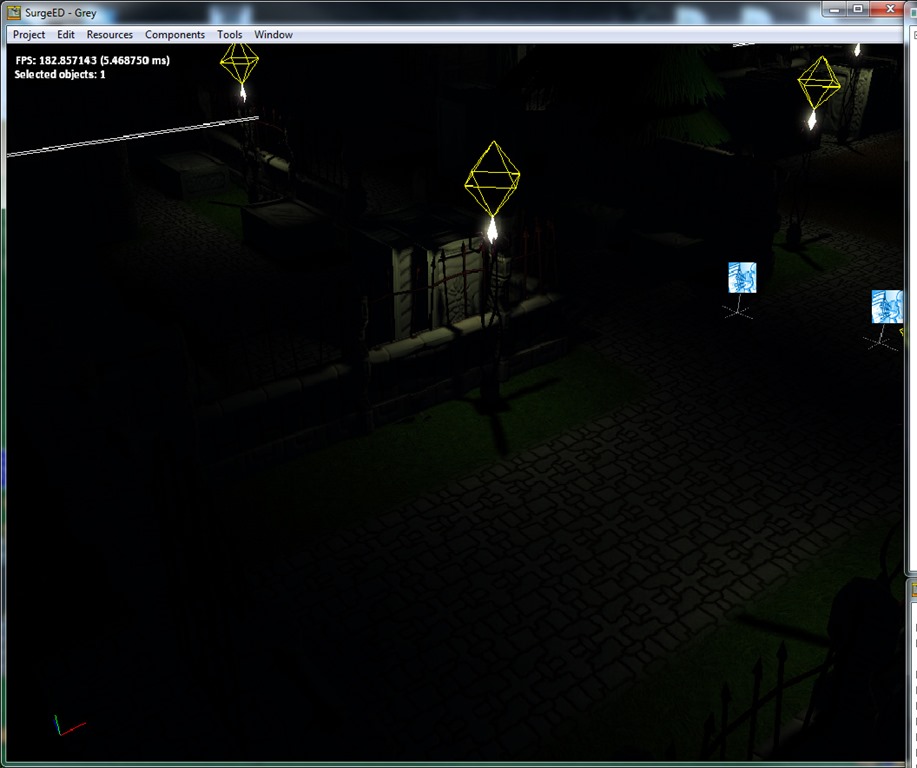
I’ve finally put in the game the summoning system as a whole… It still needs some work (specially the effect, but I’ll leave that to the polish phase), but the system itself is 100% functional now!
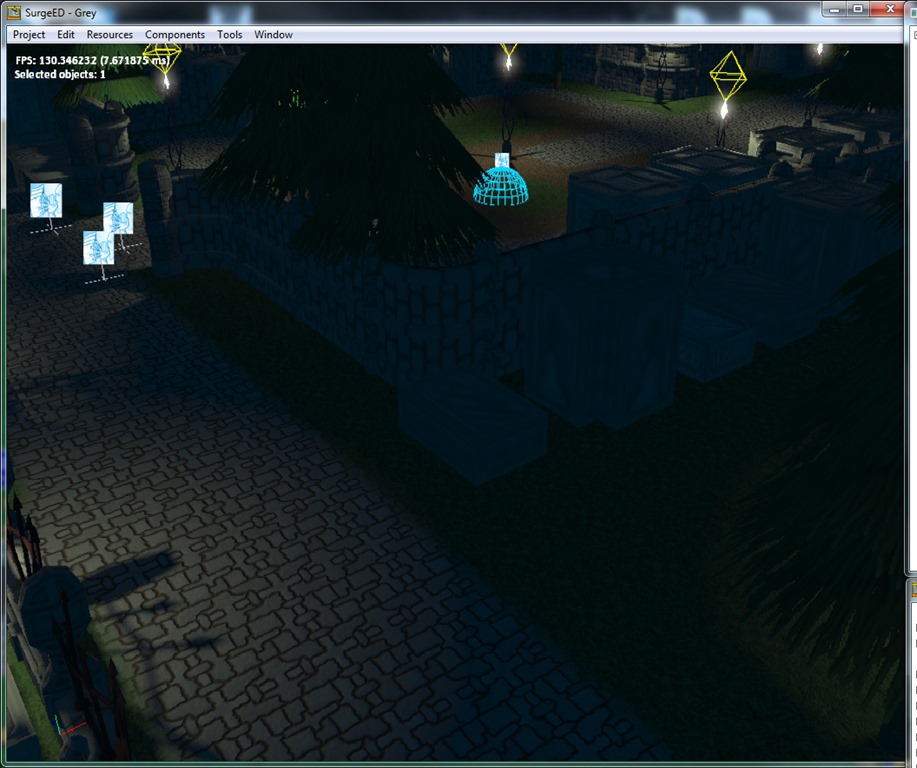
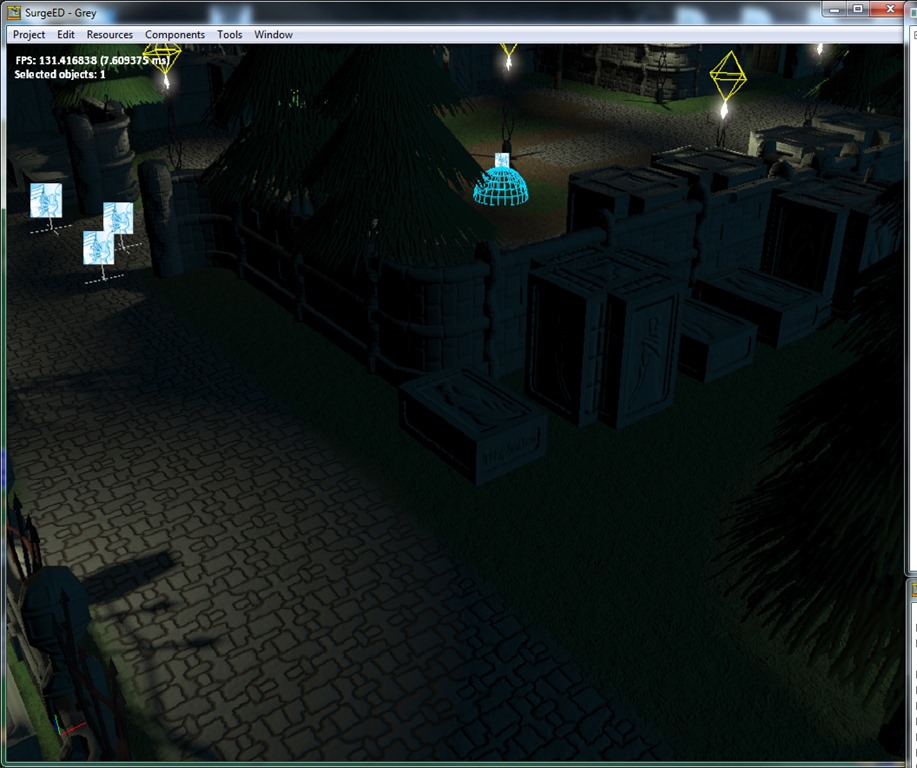
Had to add a dissolve shader so I could fade in/out “solid” objects (instead of using alpha values)… It uses an improved Perlin noise shader (as seen in here, using just one octave), and a filter to clip the rendering on some places according to a threshold. This threshold is then driven by the effect system to change with time.
It’s pretty neat, actually, and there’s the big temptation of playing around with the system to get it looking better and better, but I have more important things to do, namely the hard work of balancing the upkeeps for maintaining control over the creatures…
The idea is that the lifeshaped creatures can only be kept under Grey’s control if he has enough “Resolve” to keep them that way… If Grey runs out of “Resolve”, he’ll lose control of the creatures and they’ll attack him… Not nice, specially during a battle!
Anyway, I’m having some difficulty balancing the equations on this, but fear not, I’ll get there… Upkeeps are trickier to manage than gear stats or creature power… it’s not as “direct”…
Anyway, back to work! 
Well, if you’ve been following this blog, you already know that I use Lua to script everything in the game… it’s a great language, but sometimes it has its quirks…
I spend the last couple of days trying to solve an issue that arose when I lifeshaped exactly 10 imps to life… the 10th one would lead to a crash in the luajit kernel, which is kind of inaccessible to me… as I believed my code was to blame instead of luajit (it’s in use for so many years), and if I changed the order of some operations, the crash would be in a completely different place, so I started hunting for the problem…
Turns out the problem was creating a new coroutine from within a coroutine… On SurgePlayer, I ask the system to create a coroutine (so, at the C++ level). After the coroutine is created, the first iteration of it is called, and this coroutine was creating a new one as well… So far, so good, I’ve done similar things a million times, but it seems that this has a very small chance of having problems (and debugging was a nightmare since one of the consequences was the lost of the stack frame)… So, while I haven’t figured out exactly what the problem was, since the symptoms were very similar to a multithreading issue, I applied the same reasoning to the solution, and prevented the creation of coroutines from inside coroutines… Now, when I create a coroutine, it gets added to a list of “coroutines to be created and run”, and only at the end of the animation pump I actually create them…
This apparently made the problem go away (after extensive testing, nothing guarantees the problem won’t appear again), so my guess was that the previous system was changing data that wasn’t supposed to be changed while running…
Anyway, Lua is still number one, but since I dislike writing binds, I built a tool that analyzes my source code for some tokens and builds the binds itself… This works great, and really reduces my time spend writing binds (and makes them more reliable)…
So, I have pieces of code in the C++ like this:
    LUA_OBJ_CALL    inline    Vec3f            get_pos()    { return _object3d.get()->pos; }
    LUA_OBJ_CALL    virtual    void            set_pos(const Vec3f& p) { _object3d.get()->pos=p; }
    LUA_OBJ_CALL            Vec3f            get_proj_pos(const Vec3f& offset);
    LUA_OBJ_CALL    inline    Vec3f            get_dir() { Vec3f ret; _object3d.get()->ori.rotate_point(ret,Vec3f::UNIT_Z); return ret; }
    LUA_OBJ_CALL    inline    Vec3f            get_up() { Vec3f ret; _object3d.get()->ori.rotate_point(ret,Vec3f::UNIT_Y); return ret; }
    LUA_OBJ_CALL    inline    Vec3f            get_right() { Vec3f ret; _object3d.get()->ori.rotate_point(ret,Vec3f::UNIT_X); return ret; }
    LUA_OBJ_CALL            void            set_dir(const Vec3f& d);
    LUA_OBJ_CALL    inline    Quaternionf        get_ori() { return _object3d.get()->ori; }
The tool I built (buildffi) detects the “LUA_OBJ_CALL” and writes the corresponding FFI code that bridges the C++/Lua world. It has some other nice tricks built in (for singleton access and debug outputs), but it’s basically this… It does all the translation between the Lua types and my own types (even templated ones, like Vec3f), and in the future it will do the doc generation (through an ancillary file)… I’m also thinking of adding some development time checks to the functions (a kind of developer build of the SurgePlayer), in which the correctness of the parameters will be verified (instead of a straightforward crash if something happens that I ‘m not expecting).
Out of curiosity, the above piece of code generates the following C binds:
LuaVec3 __declspec(dllexport) get_pos(ISurgeObject* SELF_OBJECT)
{
    if (!SELF_OBJECT)
    {
        sclog(SCLOG_WARNING,"NULL pointer passed to function get_pos (C:get_pos)!");
        return Vec3f_to_Lua(Vec3f::ZERO);
    }

    auto obj0=obj_conv<SurgeObject2d>(SELF_OBJECT);
    if (obj0) return Vec3f_to_Lua(obj0->get_pos());
    auto obj1=obj_conv<SurgeObject3d>(SELF_OBJECT);
    if (obj1) return Vec3f_to_Lua(obj1->get_pos());

    if (SELF_OBJECT->get_implementation())
        sclog(SCLOG_WARNING,"get_pos (C:get_pos) can't be called on an object of type %s!",SELF_OBJECT->get_entity_type_string());

    return Vec3f_to_Lua(Vec3f::ZERO);
}

void __declspec(dllexport) set_pos(ISurgeObject* SELF_OBJECT,LuaVec3 p)
{
    if (!SELF_OBJECT)
    {
        sclog(SCLOG_WARNING,"NULL pointer passed to function set_pos (C:set_pos)!");
        return;
    }

    auto obj0=obj_conv<SurgeObject2d>(SELF_OBJECT);
    if (obj0) { obj0->set_pos(Lua_to_Vec3f(p)); return; }
    auto obj1=obj_conv<SurgeObject3d>(SELF_OBJECT);
    if (obj1) { obj1->set_pos(Lua_to_Vec3f(p)); return; }

    if (SELF_OBJECT->get_implementation())
        sclog(SCLOG_WARNING,"set_pos (C:set_pos) can't be called on an object of type %s!",SELF_OBJECT->get_entity_type_string());
}

LuaVec3 __declspec(dllexport) get_proj_pos(ISurgeObject* SELF_OBJECT,LuaVec3 offset)
{
    if (!SELF_OBJECT)
    {
        sclog(SCLOG_WARNING,"NULL pointer passed to function get_proj_pos (C:get_proj_pos)!");
        return Vec3f_to_Lua(Vec3f::ZERO);
    }

    auto obj0=obj_conv<SurgeObject3d>(SELF_OBJECT);
    if (obj0) return Vec3f_to_Lua(obj0->get_proj_pos(Lua_to_Vec3f(offset)));

    if (SELF_OBJECT->get_implementation())
        sclog(SCLOG_WARNING,"get_proj_pos (C:get_proj_pos) can't be called on an object of type %s!",SELF_OBJECT->get_entity_type_string());

    return Vec3f_to_Lua(Vec3f::ZERO);
}

LuaVec3 __declspec(dllexport) get_dir(ISurgeObject* SELF_OBJECT)
{
    if (!SELF_OBJECT)
    {
        sclog(SCLOG_WARNING,"NULL pointer passed to function get_dir (C:get_dir)!");
        return Vec3f_to_Lua(Vec3f::ZERO);
    }

    auto obj0=obj_conv<SurgeObject2d>(SELF_OBJECT);
    if (obj0) return Vec3f_to_Lua(obj0->get_dir());
    auto obj1=obj_conv<SurgeObject3d>(SELF_OBJECT);
    if (obj1) return Vec3f_to_Lua(obj1->get_dir());

    if (SELF_OBJECT->get_implementation())
        sclog(SCLOG_WARNING,"get_dir (C:get_dir) can't be called on an object of type %s!",SELF_OBJECT->get_entity_type_string());

    return Vec3f_to_Lua(Vec3f::ZERO);
}

LuaVec3 __declspec(dllexport) get_up(ISurgeObject* SELF_OBJECT)
{
    if (!SELF_OBJECT)
    {
        sclog(SCLOG_WARNING,"NULL pointer passed to function get_up (C:get_up)!");
        return Vec3f_to_Lua(Vec3f::ZERO);
    }

    auto obj0=obj_conv<SurgeObject2d>(SELF_OBJECT);
    if (obj0) return Vec3f_to_Lua(obj0->get_up());
    auto obj1=obj_conv<SurgeObject3d>(SELF_OBJECT);
    if (obj1) return Vec3f_to_Lua(obj1->get_up());

    if (SELF_OBJECT->get_implementation())
        sclog(SCLOG_WARNING,"get_up (C:get_up) can't be called on an object of type %s!",SELF_OBJECT->get_entity_type_string());

    return Vec3f_to_Lua(Vec3f::ZERO);
}

LuaVec3 __declspec(dllexport) get_right(ISurgeObject* SELF_OBJECT)
{
    if (!SELF_OBJECT)
    {
        sclog(SCLOG_WARNING,"NULL pointer passed to function get_right (C:get_right)!");
        return Vec3f_to_Lua(Vec3f::ZERO);
    }

    auto obj0=obj_conv<SurgeObject2d>(SELF_OBJECT);
    if (obj0) return Vec3f_to_Lua(obj0->get_right());
    auto obj1=obj_conv<SurgeObject3d>(SELF_OBJECT);
    if (obj1) return Vec3f_to_Lua(obj1->get_right());

    if (SELF_OBJECT->get_implementation())
        sclog(SCLOG_WARNING,"get_right (C:get_right) can't be called on an object of type %s!",SELF_OBJECT->get_entity_type_string());

    return Vec3f_to_Lua(Vec3f::ZERO);
}

oid __declspec(dllexport) set_dir(ISurgeObject* SELF_OBJECT,LuaVec3 d)
{
    if (!SELF_OBJECT)
    {
        sclog(SCLOG_WARNING,"NULL pointer passed to function set_dir (C:set_dir)!");
        return;
    }

    auto obj0=obj_conv<SurgeObject2d>(SELF_OBJECT);
    if (obj0) { obj0->set_dir(Lua_to_Vec3f(d)); return; }
    auto obj1=obj_conv<SurgeObject3d>(SELF_OBJECT);
    if (obj1) { obj1->set_dir(Lua_to_Vec3f(d)); return; }

    if (SELF_OBJECT->get_implementation())
        sclog(SCLOG_WARNING,"set_dir (C:set_dir) can't be called on an object of type %s!",SELF_OBJECT->get_entity_type_string());
}

LuaQuaternion __declspec(dllexport) get_ori(ISurgeObject* SELF_OBJECT)
{
    if (!SELF_OBJECT)
    {
        sclog(SCLOG_WARNING,"NULL pointer passed to function get_ori (C:get_ori)!");
        return Quaternion_to_Lua(Quaternionf::IDENTITY);
    }

    auto obj0=obj_conv<SurgeObject2d>(SELF_OBJECT);
    if (obj0) return Quaternion_to_Lua(obj0->get_ori());
    auto obj1=obj_conv<SurgeObject3d>(SELF_OBJECT);
    if (obj1) return Quaternion_to_Lua(obj1->get_ori());

    if (SELF_OBJECT->get_implementation())
        sclog(SCLOG_WARNING,"get_ori (C:get_ori) can't be called on an object of type %s!",SELF_OBJECT->get_entity_type_string());

    return Quaternion_to_Lua(Quaternionf::IDENTITY);
}
It also generates the FFI binds on the Lua side, which is great…
So, instead of having to write: the function itself (C++), the bind (C), and the Lua FFI declaration (Lua), and in the future, the documentation (Doxygen or something like that), I just do the C++ part and let the tool build the code…
Currently, the system generates about 4000 lines of code… and if I want to go to old-style Lua (for platforms that don’t support LuaJIT, for example), I can just change the generator and get the old-school Lua binds (wouldn’t be that easy because standard Lua doesn’t support the data types necessary, but it’s doable).
Anyway, work has been going great… I wish I had vacations more often! 
This last week I’ve been spending my free time working on the effect system, again… I remembered that I have the need to parameterize effects (for example, cast effects must take parameters like the target position or the cast time), and for that I had to refactor the whole thing yet again…
Good news: I didn’t really use it yet for real… Bad news: I even didn’t had the occasion to use it! 
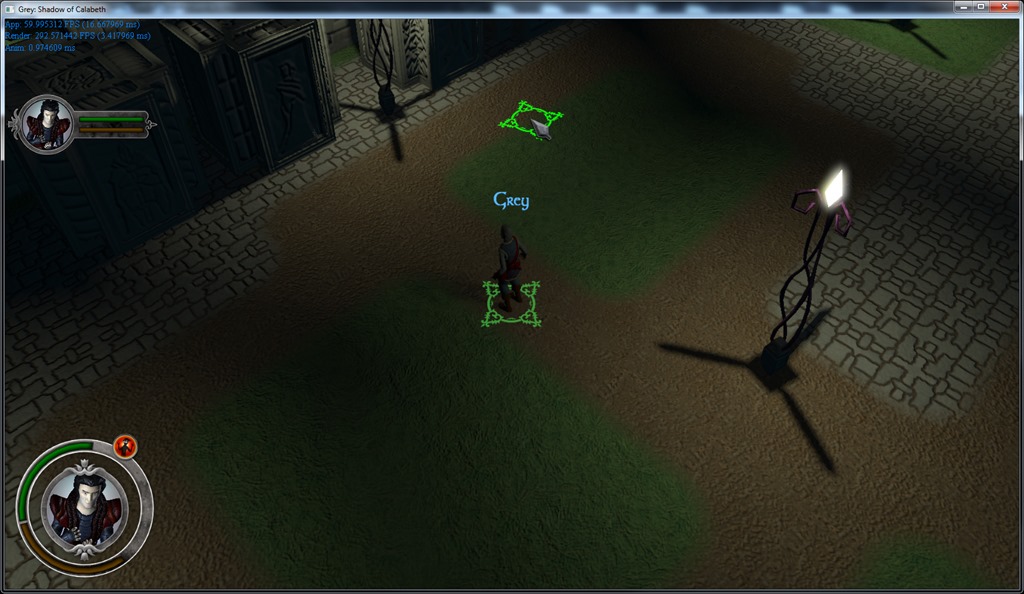
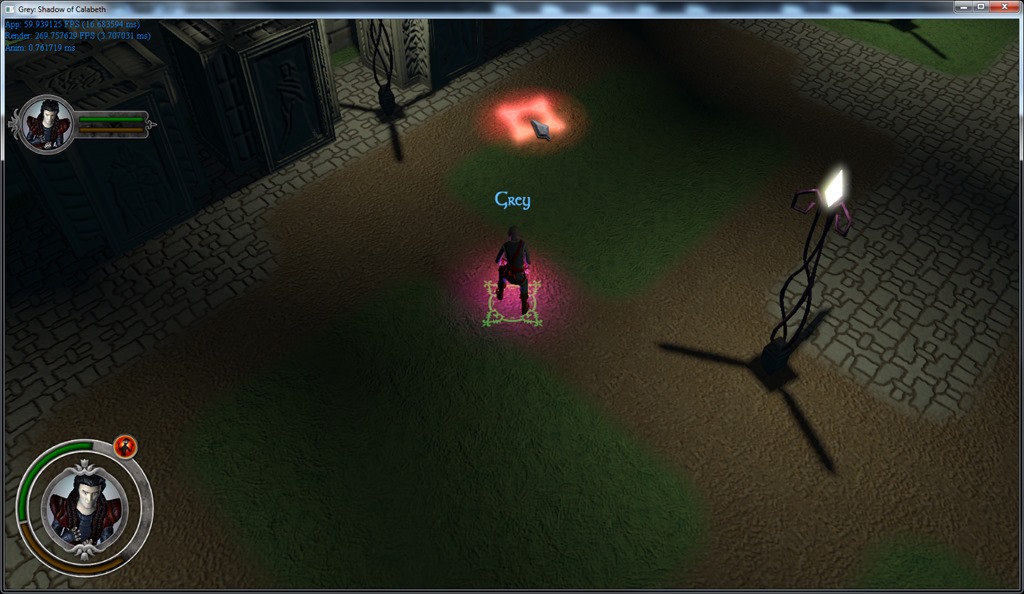
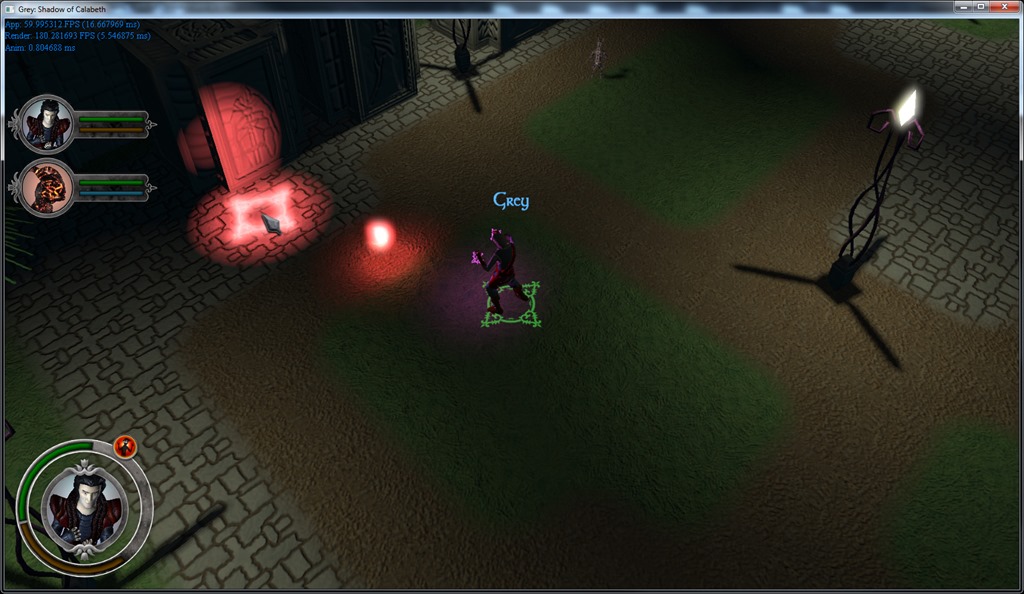
Anyway, I’ve been working on game code for real, which means that I finally can control Grey’s abilities, and the first one is the life-shape ritual… I decided to go for a “common” effect that I can parameterize.
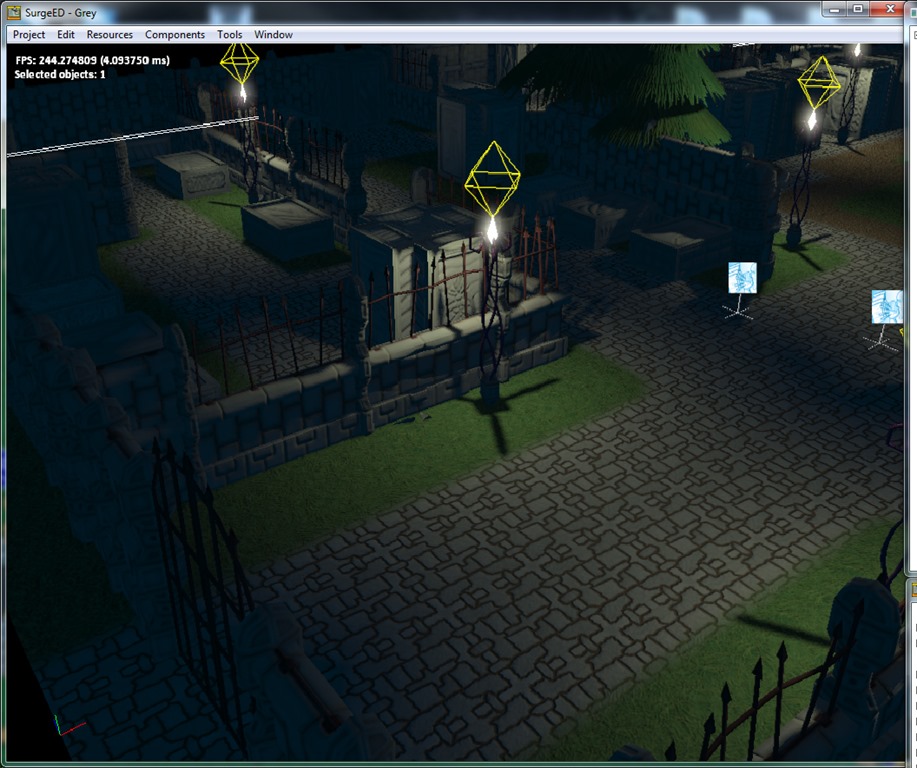
First, select the target position (currently it doesn’t account for range and line-of-sight):
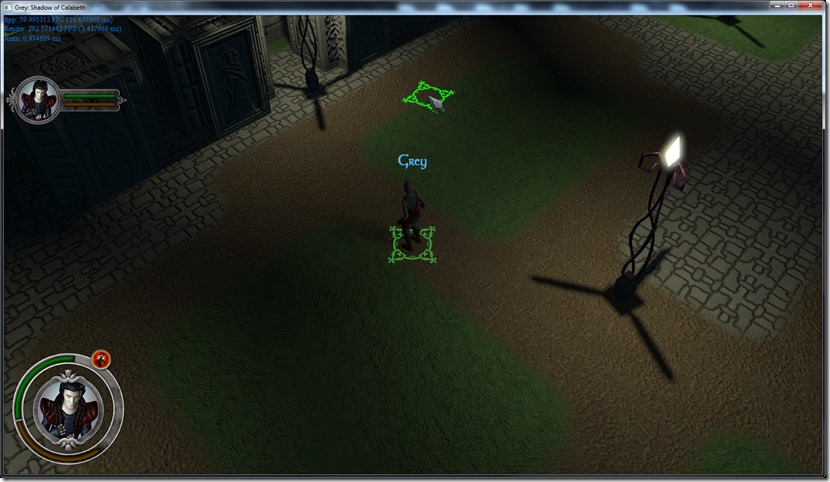
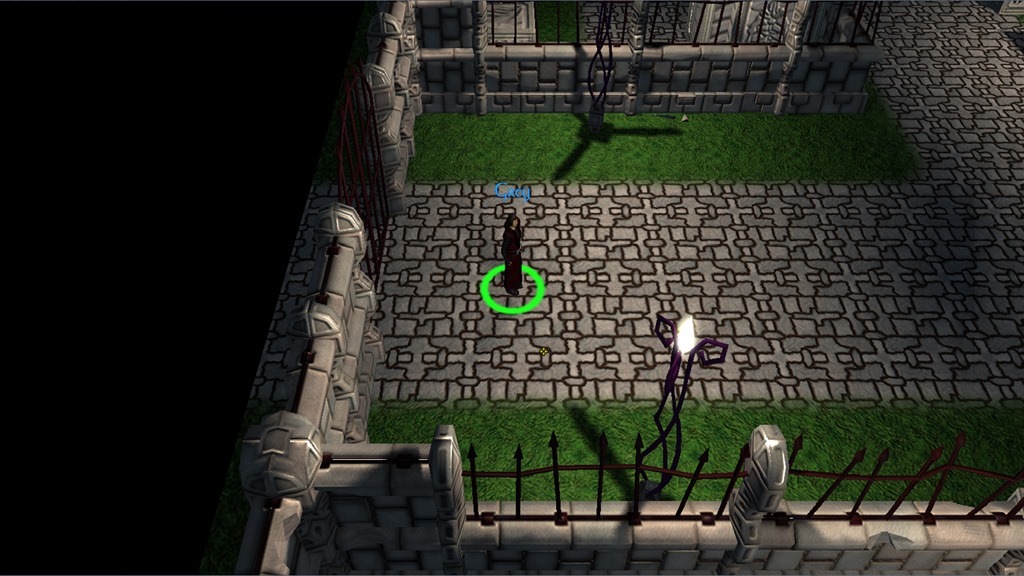
Then, the effect starts (it counts as casting time):
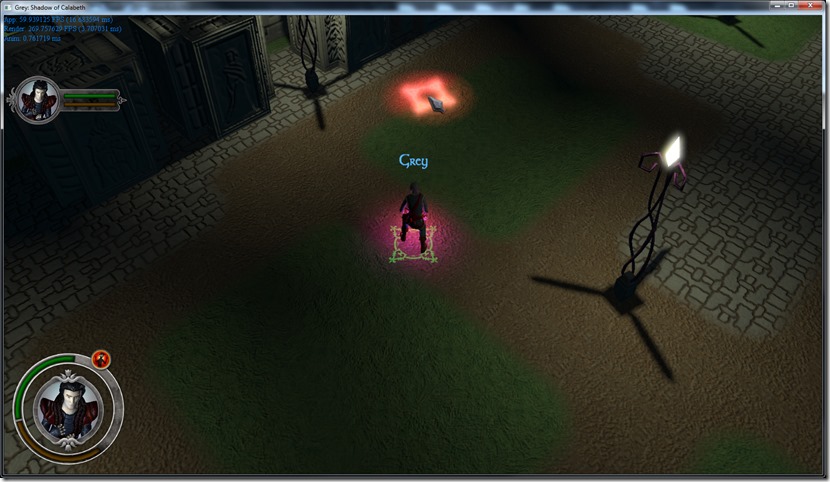
Some lights and 3d sprites moving, and then I spawn the creature (normal spawn methods) and apply a “spherify” shader, which converts any mesh to a blob, and lerps between that shape and the normal one, depending on a parameter, that gets animated by the effect:
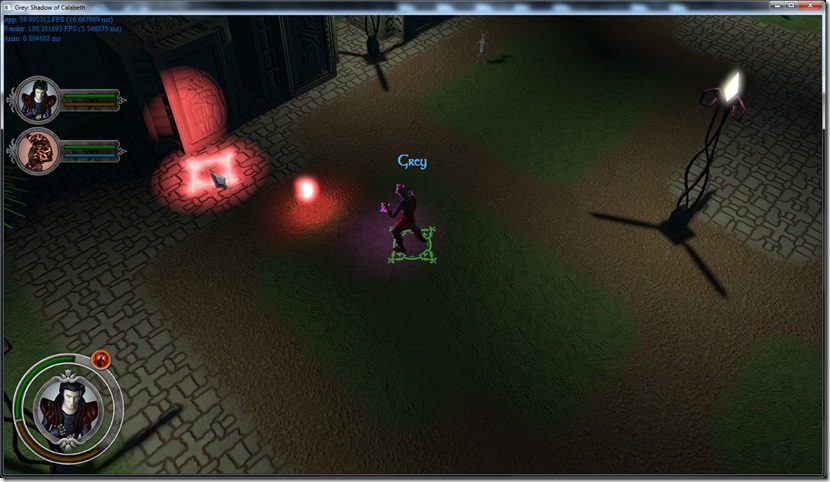
Don’t have tools to record video here to show it in movement, but since I’m not 100% happy with the spell effect, it’s probably better that way…
Working on spell effects is always tricky… you’re never 100% happy (because you’re too close), and you have one million ideas on how to improve it, but when you try them in practice, it doesn’t look so great anymore… I also lost the hot-reload of effects for some reason (need to find that bug out), which doesn’t help (working on my laptop which is very slow compared to my normal development machine, but hey, I’m on vacation!)
Anyway, it’s good starting to see the pieces of actual game clicking… there’s one million things remaining to be done, but the game itself is finally moving forward, which is great, especially because motivation has been running low lately (and a lot of game ideas have been jumping around in my head!)… I wish I could make my living out of this! 
In the last weeks, I’ve been working on and off in my new UI system… It’s about the 100th time I try to make an UI system for a game, since I always end up with a system that I don’t like…
First of all, I hate UI work, it’s simply not fun… Second, I’m picky about UI systems… they tend to be unwieldy or not game-oriented (so slow rendering performance).
This time, I decided to use some lessons learned with my RealJob™, in which I do a lot of Javascript/HTML/CSS frontends.
So, what I did was define a CSS-like language to express the visual appearance of elements:
.default
{
    color: white;
    interaction: false;
};

.mouse_cursor
{
    image-bank: "ui";
    image-name: "cursor_normal";
};

miniframe_main
{
    position: (80,200,0.3);
};

miniframe_base
{
    image-bank: "ui";
    image-name: "miniframe";
    position: (0,0,0);
};

miniframe_base_mask : miniframe_base
{
    image-name: "miniframe_portraitmask";
    image-mode: "mask";
    position: (0,0,0.02);
};

miniframe_base_portrait
{
    position: (-50,-50,0.02);
    interaction: true;
    image-bank: "portraits";
    image-name: "portrait_grey";
    width: 100;
    height: 100;
};

miniframe_base_bar
{
    image-bank: "ui";
    image-name: "miniframe_healthbar";
};

miniframe_bar : miniframe_base_bar
{
    width: 5;
    segment-count: 2;
    path: shape
    {
        line
        {
            start-pos: (0,0);
            end-pos: (122,0);
        };
    };
    texture-fill: true;
    texture-fit: true;
    color: yellow;
};

characterframe_main
{
    position: (150,930,0.3);
};

characterframe_base
{
    image-bank: "ui";
    image-name: "maincharacterframe";
    position: (0,0,0);
};

characterframe_base_mask : characterframe_base
{
    image-name: "maincharacterframe_mask";
    image-mode: "mask";
    position: (0,0,0.02);
};

characterframe_base_portrait
{
    position: (-85,-88,0.02);
    interaction: true;
    image-bank: "portraits";
    image-name: "portrait_grey";
    width: 174;
    height: 174;
};

characterframe_resource_bar_base
{
    image-bank: "ui";
    image-name: "maincharacterframe_resourcebar";
    position: (-123,23,-0.02);
}

characterframe_base_bar
{
    image-bank: "ui";
    image-name: "miniframe_healthbar";
};

characterframe_health_bar : characterframe_base_bar
{
    width: 7;
    segment-count: 10;
    path: shape
    {
        arc
        {
            radius: (121,121);
            limits: (-100,6);
        };
    };
    texture-fill: true;
    texture-fit: true;
    color: green;
    position: (2,-1,-0.04);
};

characterframe_resource_bar : characterframe_base_bar
{
    width: 7;
    segment-count: 10;
    path: shape
    {
        arc
        {
            radius: (121,121);
            limits: (-105,-217);
        };
    };
    texture-fill: true;
    texture-fit: true;
    color: yellow;
    position: (1,-6,-0.04);
};

characterframe_action_buttons
{
    position: (0,0,-0.06);
    wheel-radius: 140;
    wheel-start-angle: -55;
    wheel-action-count: 4;
    wheel-separation: 25;
}

lifeshape_button_base
{
    image-bank: "ui";
    interaction: true;
    position: (-30,-30,0);
};

lifeshape_button_imp : lifeshape_button_base
{
    image-name: "lifeshape_imp_normal";
    hover : class
    {
        image-name: "lifeshape_imp_hover";
    };
    clicked : class
    {
        image-name: "lifeshape_imp_click";
    };
}

lifeshape_button_wisp : lifeshape_button_base
{
    image-name: "lifeshape_wisp_normal";
    hover : class
    {
        image-name: "lifeshape_wisp_hover";
    };
    clicked : class
    {
        image-name: "lifeshape_wisp_click";
    };
}

lifeshape_button_bloodfiend : lifeshape_button_base
{
    image-name: "lifeshape_bloodfiend_normal";
    hover : class
    {
        image-name: "lifeshape_bloodfiend_hover";
    };
    clicked : class
    {
        image-name: "lifeshape_bloodfiend_click";
    };
}

lifeshape_button_skeleton : lifeshape_button_base
{
    image-name: "lifeshape_skeleton_normal";
    hover : class
    {
        image-name: "lifeshape_skeleton_hover";
    };
    clicked : class
    {
        image-name: "lifeshape_skeleton_click";
    };
}
It’s a semantic similar to CSS, but allowing for multiple inheritance of “classes” and some data of atypical types (like “curve” or “color gradient”).
Now, all elements that I create have one or more associated type, and what happens is that any type of element (for example “text” or “shape render”) will traverse the classes, looking for the applicable properties.
This works great, especially because the system supports hot-reload of styles (so I just change the style file, and it gets reflected immediately on the system, which supports fast iteration times, which is one of the most annoying points in terms of UI design).
I can instance any type of element using Lua code, but the system really shines when I use another type of file, which behaves in a similar fashion to HTML (although it’s more XML compliant):
<container>
    <container class="miniframe">
        <sprite id="frame" class="miniframe_base"/>
        <sprite id="mask" class="miniframe_base_mask"/>
        <sprite id="portrait" class="miniframe_base_portrait"/>
        <sprite id="health_bar_base" class="miniframe_base_bar" position="(60,-15,-0.02)"/>
        <shape id="health_bar" class="miniframe_bar" position="(60,-10,-0.04)"/>
        <sprite id="resource_bar_base" class="miniframe_base_bar" position="(60,5,-0.02)"/>
        <shape id="resource_bar" class="miniframe_bar" position="(60,10,-0.04)"/>
    </container>
</container>
So, with just one Lua instruction, I can instance an element with this properties (which allow for override of the class properties), while preserving the hot-reload even of these components.
So, for once in my life, I’m pretty happy with the UI system… The only problem the system currently has is that the hierarchical notion of elements is not exactly simple (the 2d system of Spellbook was never designed for hierarchies), which means that while the position of an element depends on his parent element, other properties like scaling can’t be propagated properly (yet). Clamping the rendering to a specific rectangle (for scrollers, etc) is also complicated, for example (since I use the normal blit manager that’s used for normal 2d game stuff).
One possibility for the future is to add a special kind of render view (besides the 2d and 3d), which is dedicated to UI, which can encompass this type of logic, but I’m afraid that might be overkill, considering how late the game already is…
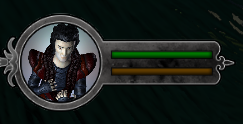
The end result of the above classes/UI elements is (zoomed):

Of course, there’s still a bucket of logic to be done on code (for example, the update of the bars), but that’s simple code.
The system also allows for some automatic behaviors, like “hover” or “click” behaviors (so that I register functions to be called when there’s a click, or a class to use when the cursor is over a component), so it’s very flexible at the moment…
By loading the correct style file, I can also consider tricky things like UI resolutions (with different screenspace settings, etc).
This took me in total about 12 hours or so of development, but I think this will pay itself nicely, considering it took me less than 1 hour to setup the current UI of the game (which is already fairly complex, with masks and curved progress bars, etc)…
Now, once more into the breach!
After a couple of weeks of pure chaos, it’s time for some vacation time, and hopefully, some “Grey”-time, we were able to get a place from a vancouver realtor and now we are extremly excited!
Since last time, there wasn’t much work done on Grey, since I was very busy with RealJob™. Mainly, I just added some UI components using the new UI system (I’ll discuss it a bit more in a few days)…
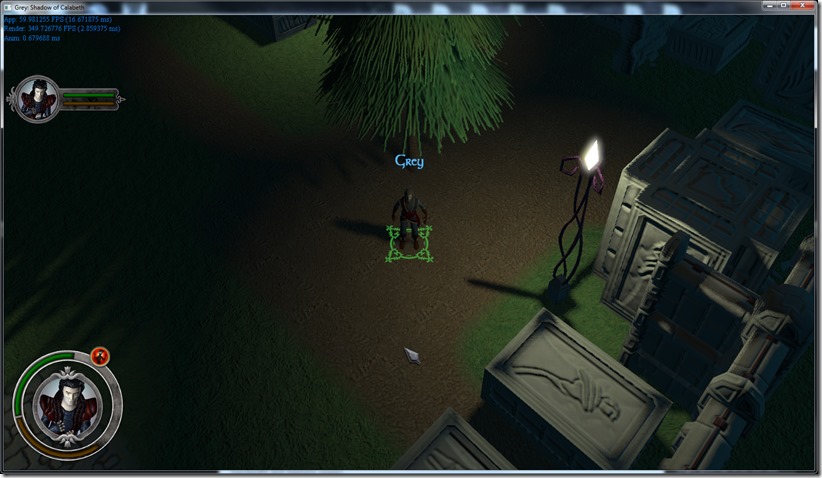
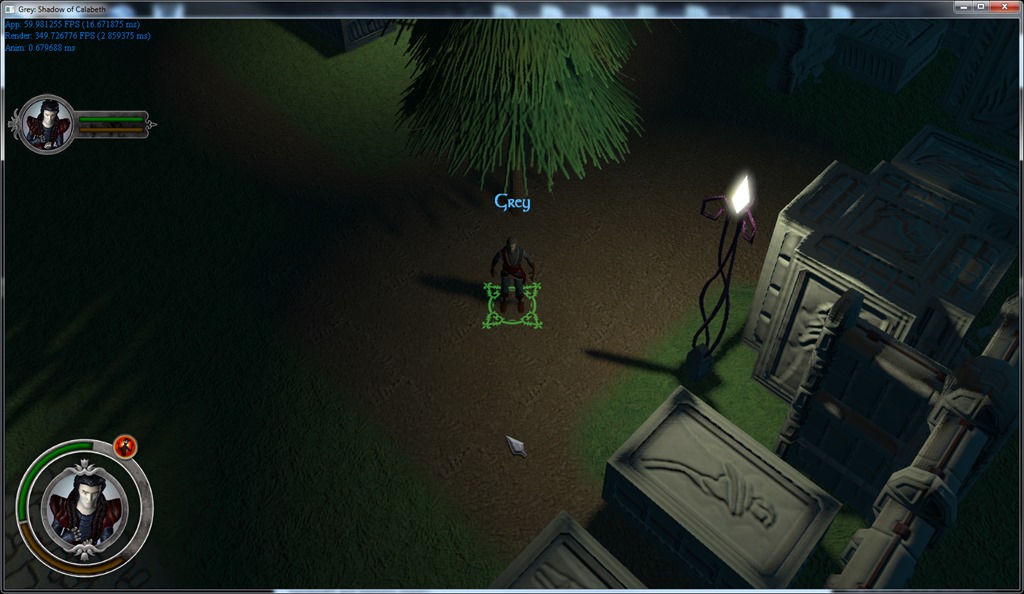
Me and Rincewind have been having a bucket-load of issues with the aesthetics of the game… While the new lighting system looks great, it’s a pain doing a good “night scene”… The graveyard either looks too bright, or too dark, and we’re having a lot of difficulty making it look “night and spooky”…
Adding blue hues to the scene might help (just need to use the colorgrading system for that), but I ‘m not sure that’s the whole problem…
Other ideas we’ve been floating around is adding a fog layer to the scene, that might make the scene look spookier, or making the green vegetation less green…
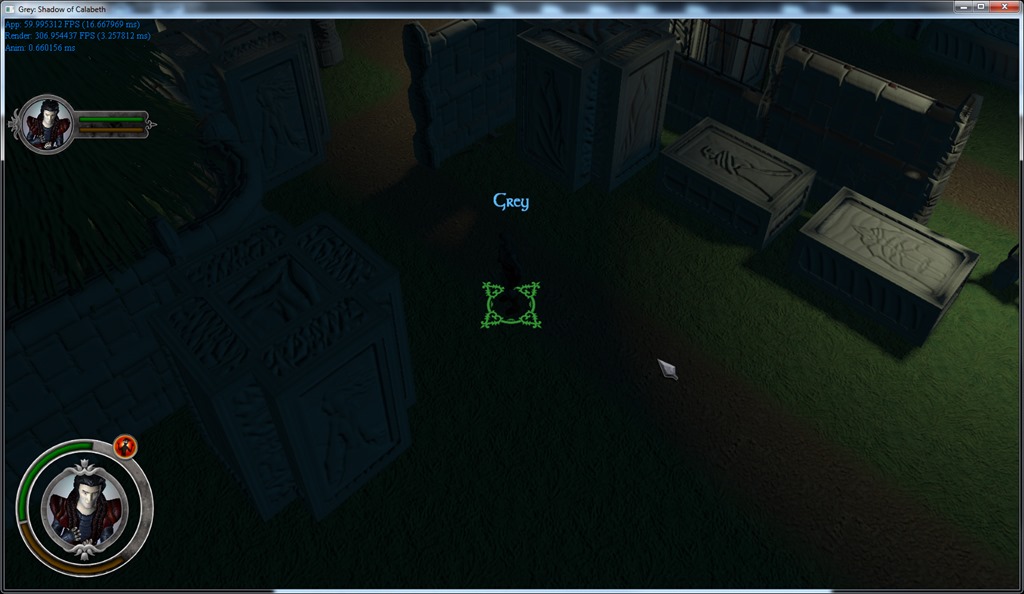
But none of those solutions solve the major problem, for me at least: you almost can’t see the character in certain spots:
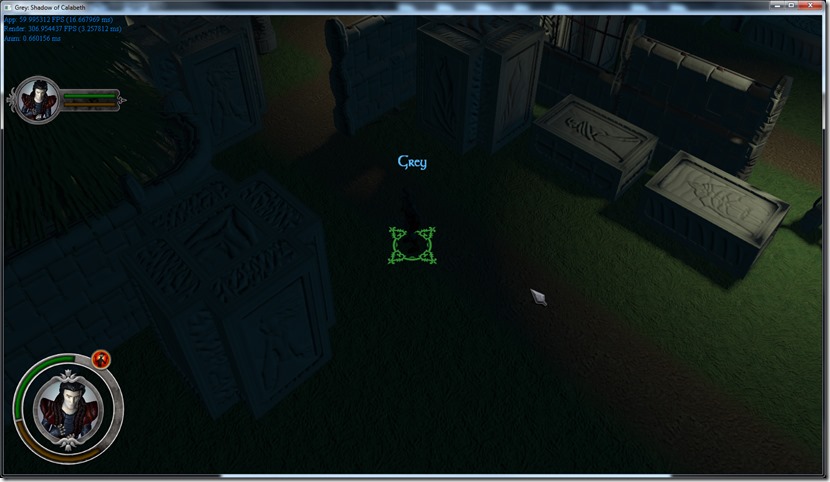
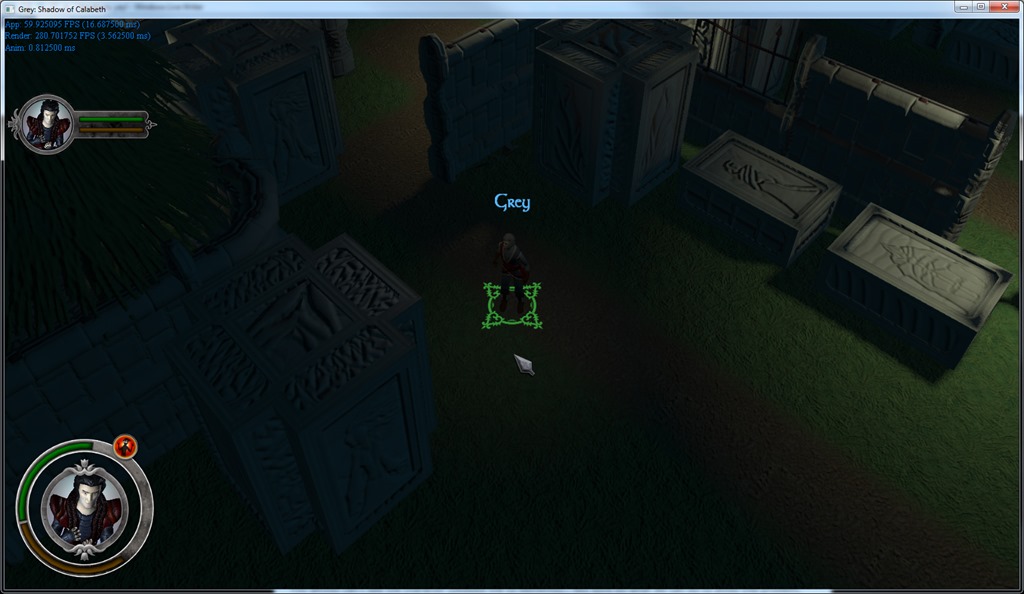
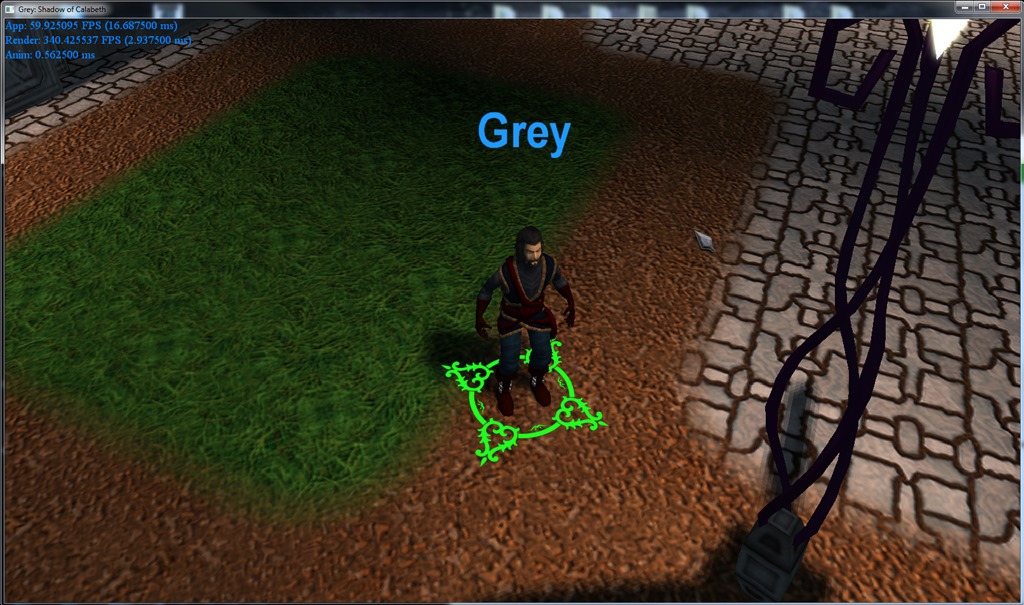
You almost can’t see the character (besides the UI elements)… Not sure on what we can do to avoid this problem, besides going for the normal solution, which is putting a light on top of the Grey character:
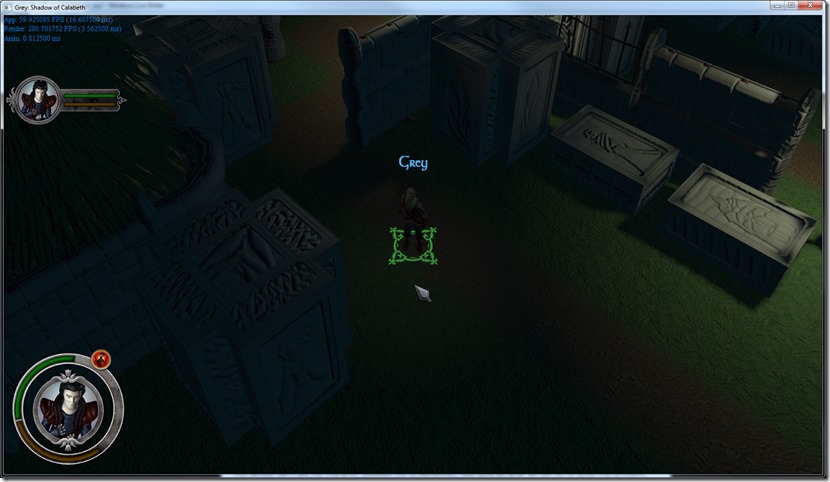
Some people like it, some people hate it (myself included)… But I’m not sure there’s another solution that might work, without playing around with the materials themselves (which might be a problem, considering the deferred renderer is not very “multi-material” friendly).
Of course, some part of my dislike of this light solution is the fact that his hair doesn’t look right, which might be solvable by perturbing the normals of the hair so they are more “tangent” than normal to the head (similar solution to real hair rendering solutions)… Anyway, I’m just leaving this the way it is for now, we don’t have to make a decision right now (thankfully, my Player is starting to work great and easily adds this light to the system from the console)…
Anyway, I’ll probably have more stuff on the blog soon… Next time, a quick run down of my new UI system!
This weekend I’ve worked a lot on the lighting system of Grey…
As I said in previous entries, I’ve decided to add gamma correction into the engine and you can see price for hostgator when you want to make your own site… Simply put, the colors we see on the screen are not linear (due in part to old technology that couldn’t do linear intensities, and now because we want to mimic the old tech)… Anyway, what this means is that 50% intensity of light in “logic terms” gets translated into approximately 25% light on the monitor, which means that everything is slightly darker than it should be…
Armed with this knowledge, I decided to apply a gamma curve to the engine… this exposed two problems:
1) Since none of the art and lighting design we’ve done in the past included the gamma correction, we went from everything being too dark to everything going too light!
2) Using an accumulation buffer for the lighting that’s only 8 bits and then applying the gamma (which is an exponential curve) would blow up the precision, which meant that the smooth color curves would be destroyed and replaced by color blobs…
The second one we solved by using a higher precision buffer for the lighting pass (still fine tuning that, to reduce bandwidth and memory usage)…
The first one was trickier, but ended up being simple… My lighting attenuation equations was a simple linear attenuation system, which is completely not correct (although it’s easy to control from the artist perspective: just indicate a point where attenuation starts and where it ends)… Light scatters in a sphere (or cone, whatever) from the emitting point. This makes the rate of decay to be in relation to the square of the distance (so it attenuates faster in the beginning)… This is harder to control for the artist, but tweaking the equation (to encompass the old linear component besides the quadric one), I’ve achieved a better, more natural falloff, and in the process, the whole scene went dark… Without gamma correction:
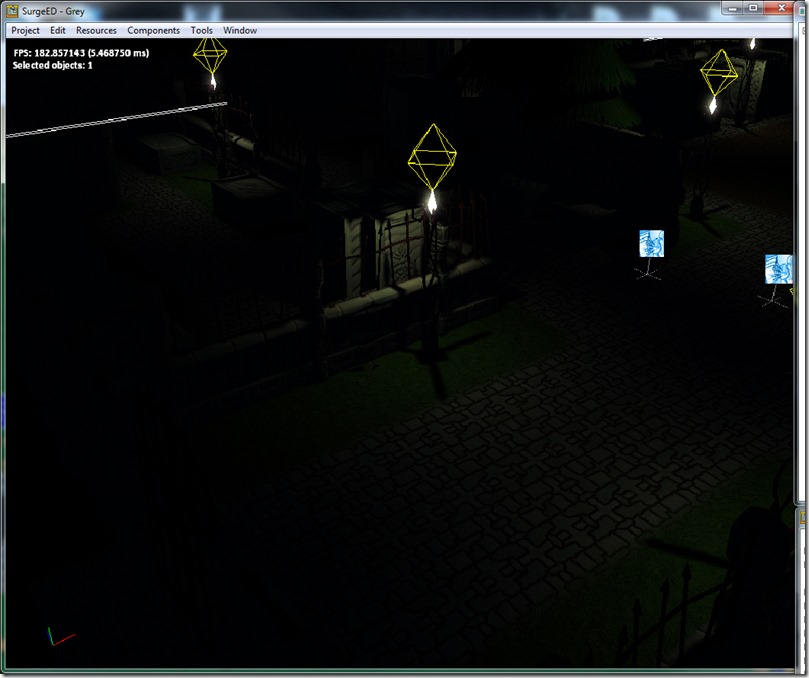
With gamma:
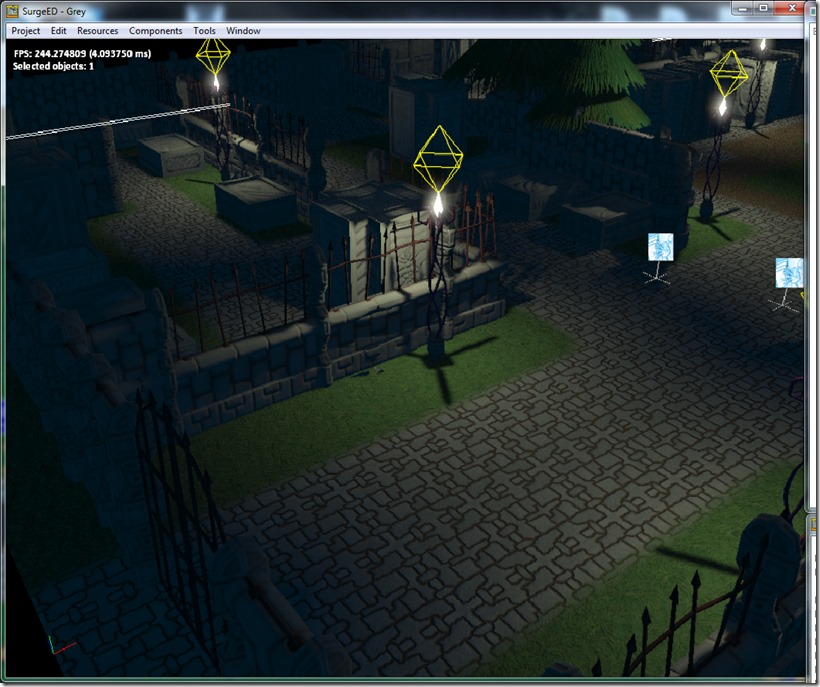
Before the new attenuation system:
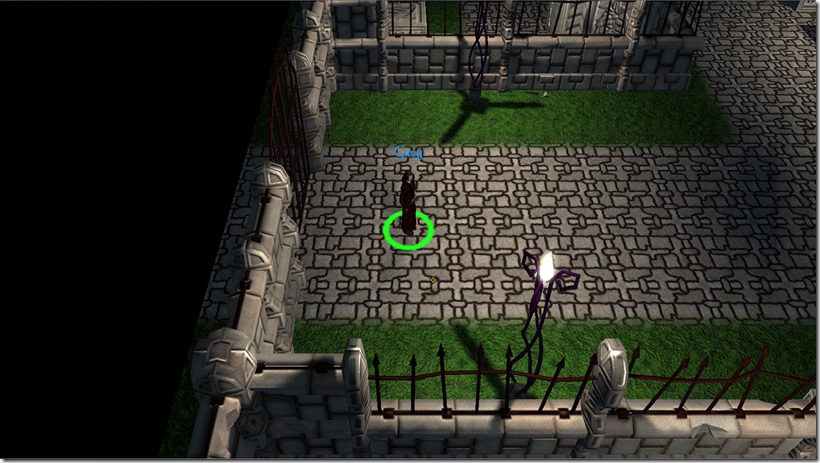
It was much “rawer”… The new lighting is smoother and feels more natural and warm…
Another gripe of mine was the ambient light… it had too much of a flat look to it:
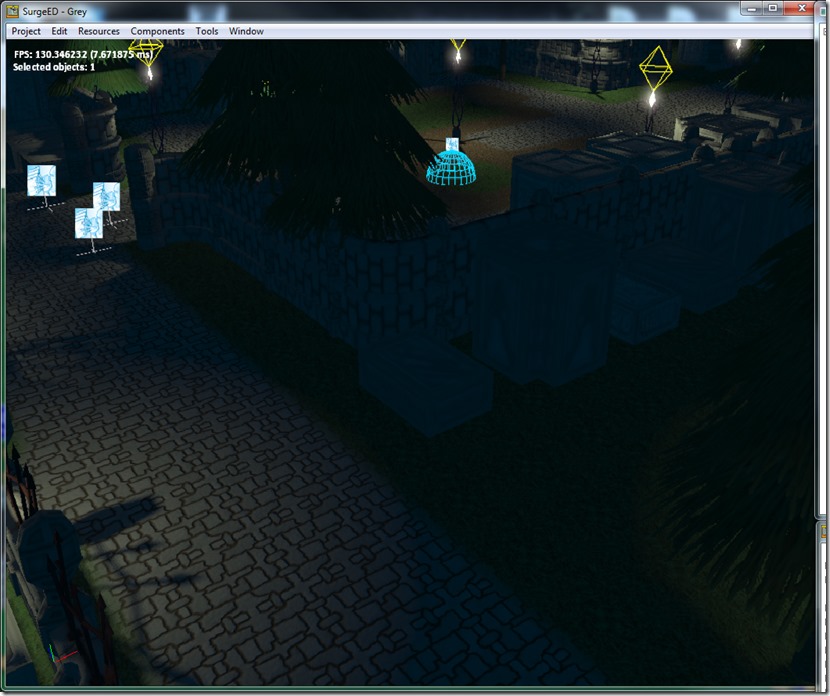
You can see the are in shadow is completely devoid of character, it looks flat (which makes sense, since ambient light comes from everywhere)… But that’s not natural, especially, because light has a predominant direction (unless you go to great lengths to avoid that, but that’s not at all natural). So, I decided to replace the ambient light in the scene by a dual-directional light (which is a directional light that lights both from a primary direction, and from the opposite one at a different intensity):
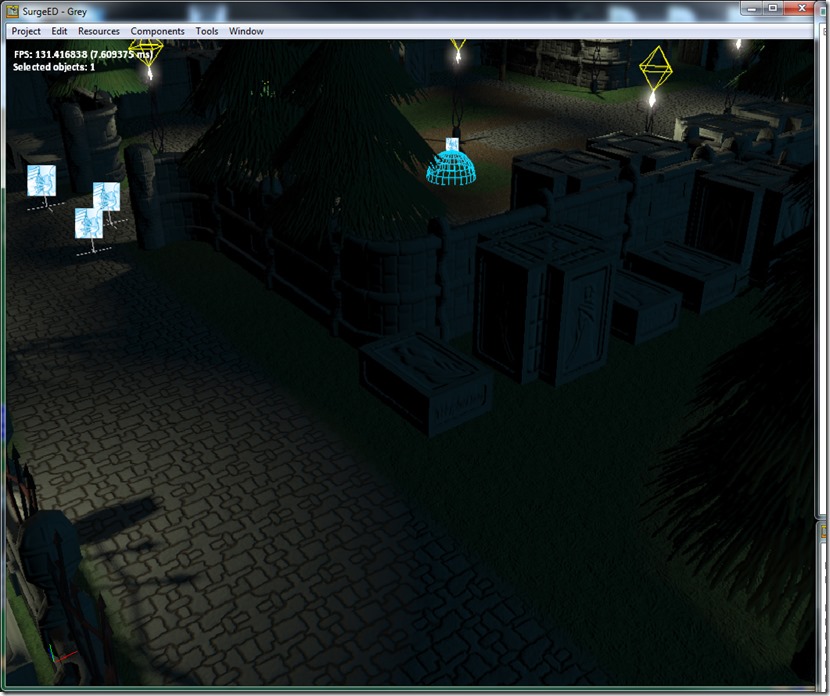
You can see that the areas in shadow look much more detailed, and yet not completely dark…
These two changes (gamma and dual-directional lights) really made a difference in the whole scene mood, without adding much overhead (the gamma still requires an extra floating point buffer for the lighting precision, but I can recoup that cost by reducing bandwidth usage on the lighting pass).
Next step on the game front is to finish the UI system (it’s working great so far, with dynamic reload of assets and such, which should help with the iteration times). On the art front, we’ve been discussing some improvements to the cemetery tileset, so hopefully we’ll be able to break the monotony of it a bit)…
See you next update!
Well, lately most development has been focused on the groundwork to get the UI system on the SurgePlayer working properly, which is progressing nicely… I’ll delve more into it on a future post, when the system is done and up and running in the game.
In the meantime, among a lot of fixing some components of the scripting system (using a tool I’ve build for automatic binds – more on this in the future as well), I’ve finally decided to put in the new Grey model…
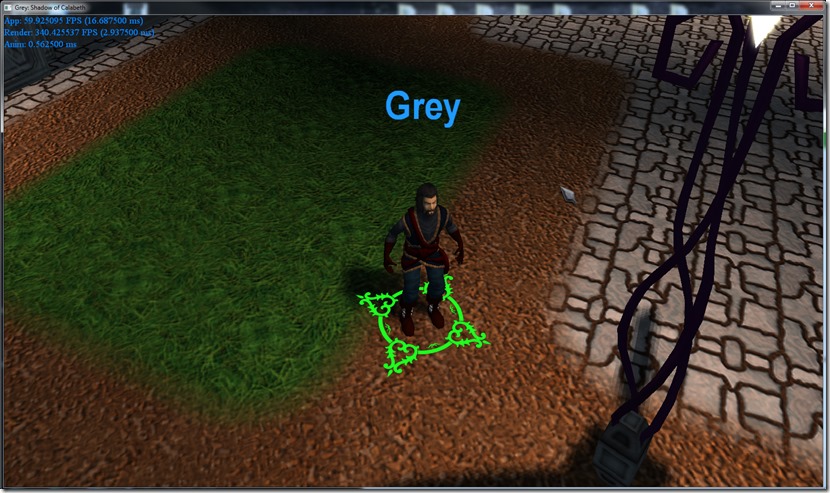
We gave it a more “earthly” dimension, so he looks less like a mage, and more like a common man, which is more in-tune with the character.
There’s still some rough edges, namely the walk/run cycle is a bit clunky; while on the DCC tools, it looks good, but in movement in-game it looks a bit weird, so it has to be fixed…
Another thing that I’m starting to notice (maybe because I’m looking at this scene for so long now) is the fact that the lighting is not completely correct… I do all math in linear-space, and I don’t do any gamma correction at the end of the pipeline, which makes the whole scene look darker than it should… It will probably be the first thing I fix when I come back from my trip to Germany next week, just to make sure the problem is indeed that…
I had one of those “I’m just changing this, it will have no impact…” moments which I deeply regretted some two weeks later…
I decided I wanted to change the XML format of the editor file slightly, to improve loading speeds and to make the hot-swap of resources simpler… in the process, I decided that the skeleton, bones, keyframes, etc should be solely owned by the mesh itself (since using a skeleton on a different mesh requires a process called retargeting, which effectively creates a new skeleton or at least new properties, so a new object). Anyway, while I was at it, I decided to couple the mesh materials and textures more closely, and in the process I broke half the engine and had to painfully rebuild a lot of code, resulting in a full refactoring of the skeleton system and others…
So now, after two weeks of work, I have nothing new, but what’s under the hood is better and more efficient, which is quite frustrating…
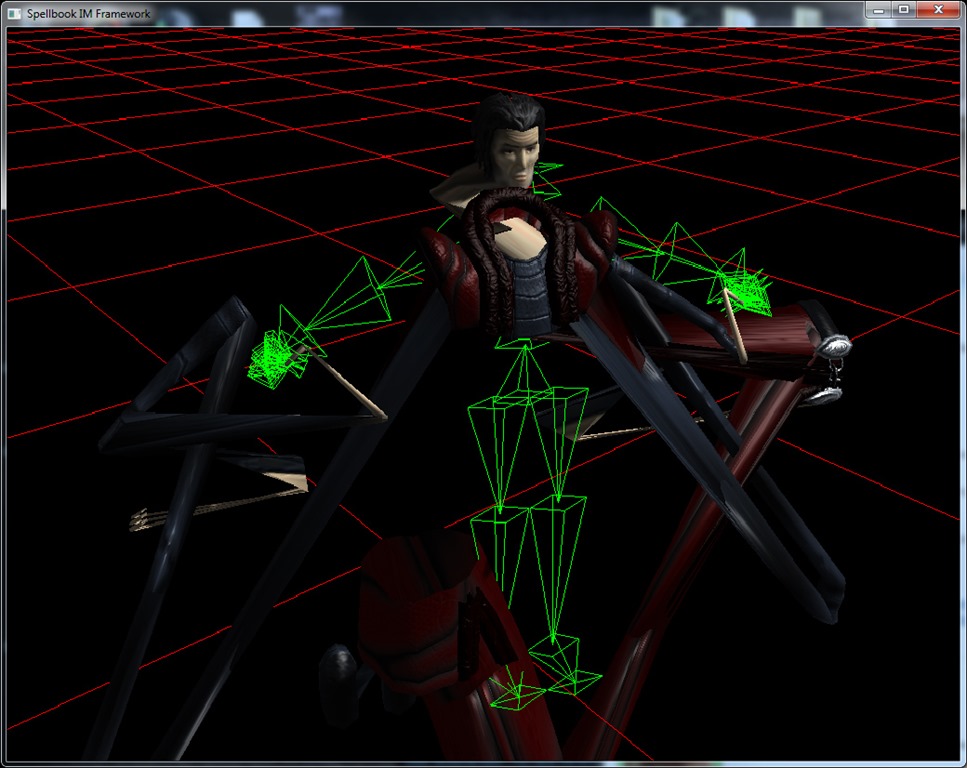
Anyway, when you work on bone systems, you run into inevitable bugs, which are always good for a chuckle:
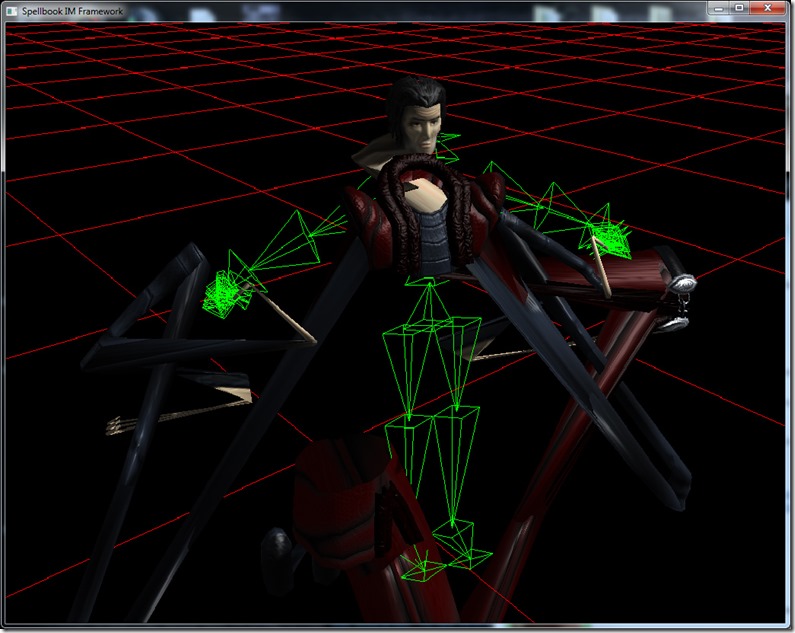
In movement, it’s even more freaky and kind of reminiscent of the creatures in Dead Space… 
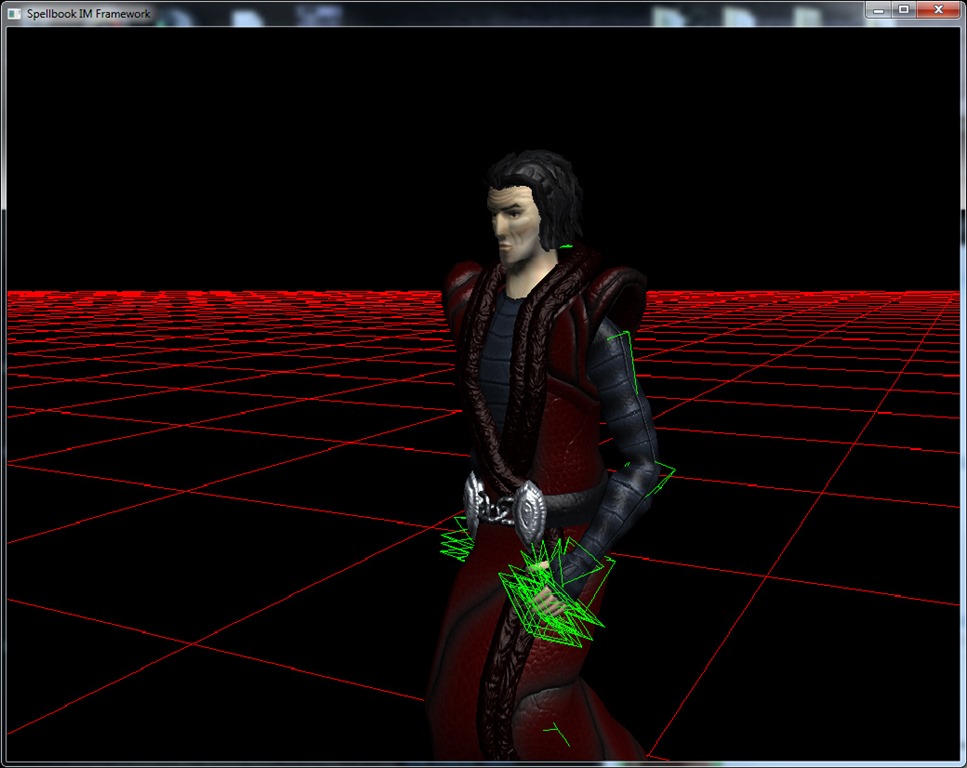
Anyway, I actually fixed that pretty quickly:
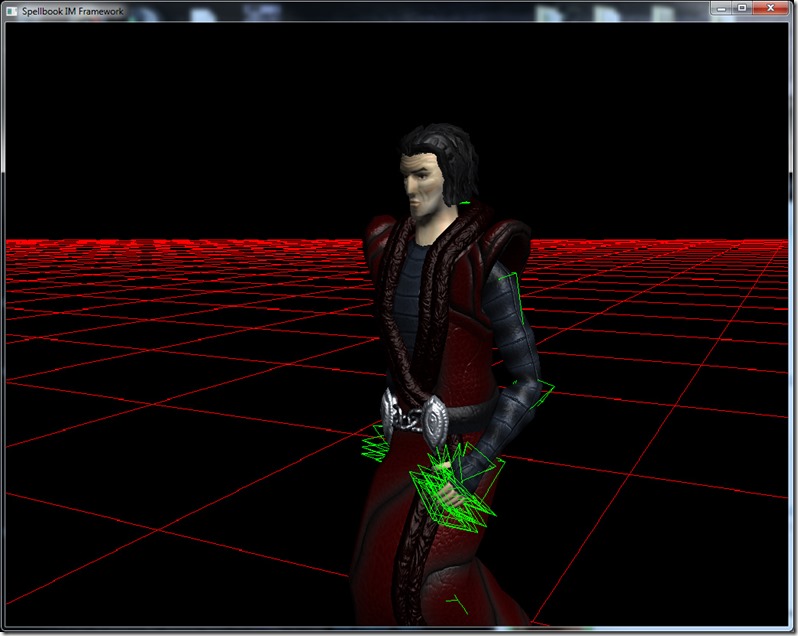
Then, I could (finally) test the resource switch, so pressing one key, a new asset is replaced (while the animation ran, etc) for the new model of Grey:
Yes, extreme blur so you can’t see it yet… Want to try it in game first…
Anyway, after I did this in a stand-alone application, had to upgrade the whole editor to support these new functionalities (and the new texture object)…
After that was done, time to turn to the Player, which signified some more hours of work (since I didn’t recall half of what I’ve done there, after 3 months of not messing with it – the joys of hobbyist work), but I finally have everything running again…
Next steps is getting the new Grey in game, and build a new UI system, leaning on what I’ve learned lately on my Javascript front… I’m going to build a CSS-type system for the UI elements, so that multi-resolutions/aspect ratios can be supported easily, without changing any code (or a minimum amount, at least)…
On my DayJob, I’m preparing a move to a new office space (closer to home, which will enable me to work a bit more on the game), so hopefully after September, work will really pick up speed…
See you guys on a future post!
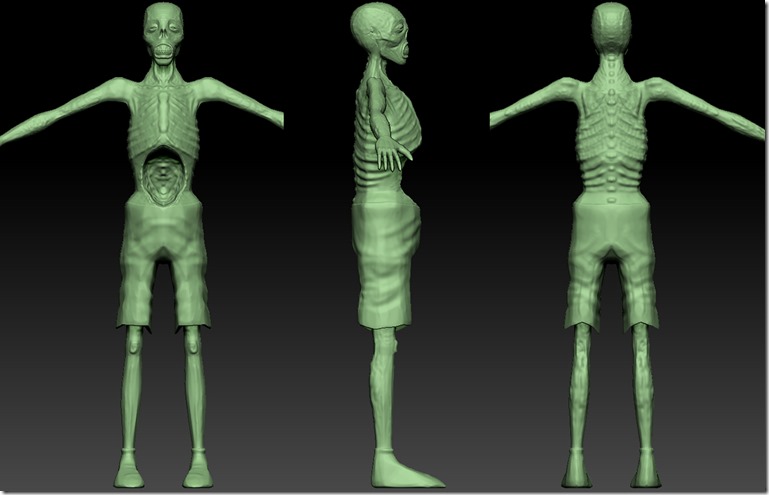
Our artist is hard at work making new assets again, which means we have pictures!
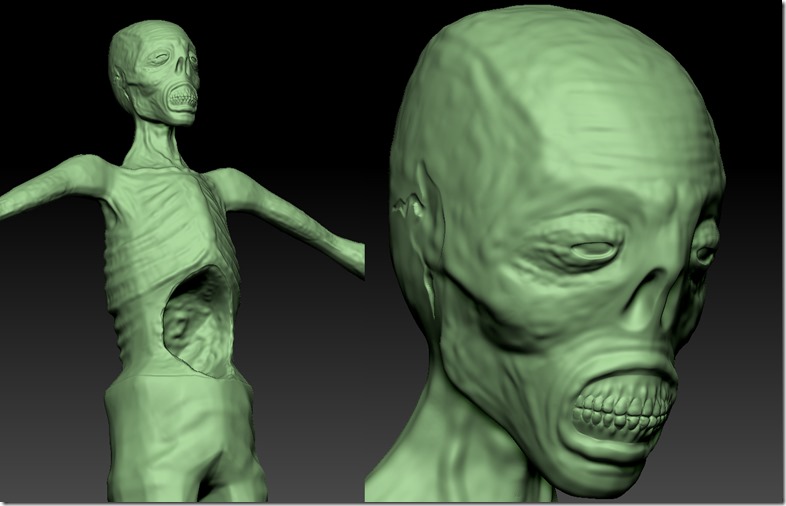
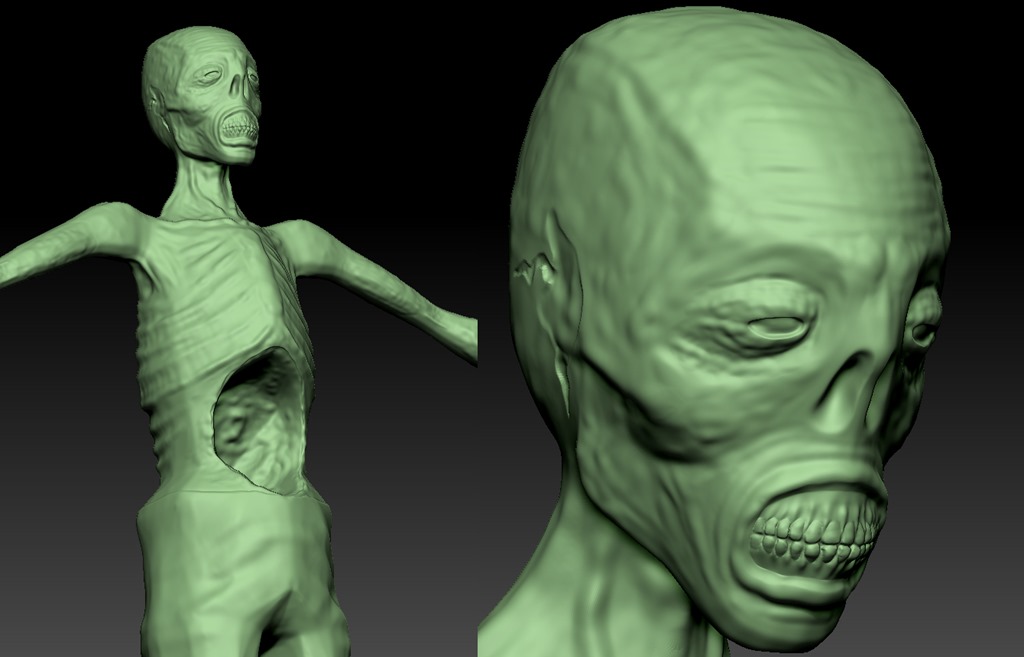
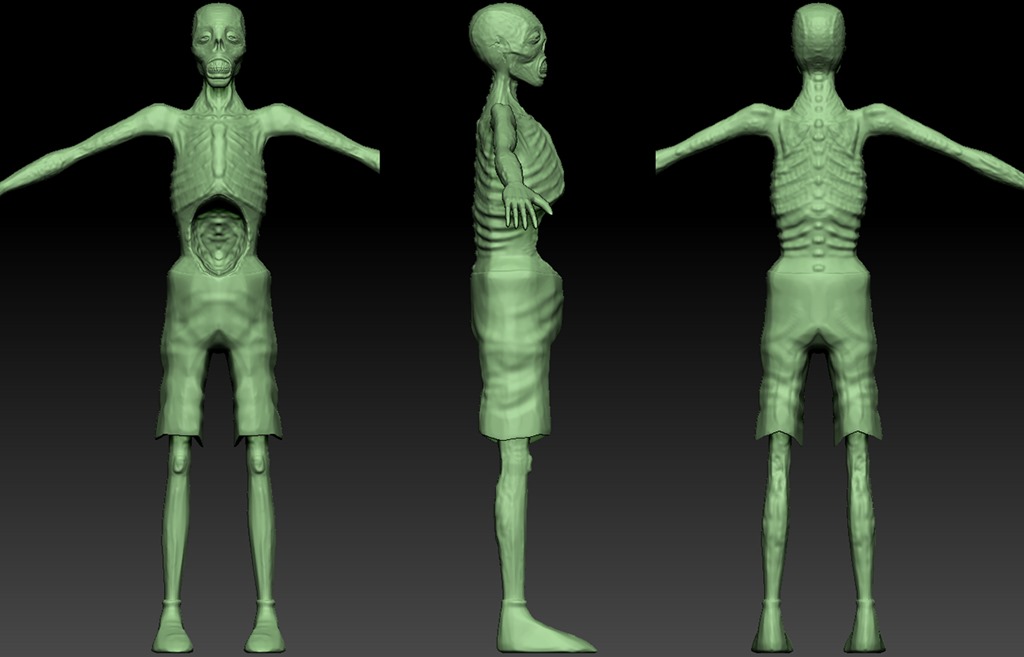
This is still work in progress… This is the zombie enemy, which comes in a variety of flavors, from the one that explodes to the one that’s only a torso!
Most of this work was done on a modeling tool, and then exported to a sculpting tool to add the detail… Some detail is still missing, but first a layer of color texture must be added to see where the detail is mostly missing…
One of the big differences between indie development and AAA is that (contrary to what would be expected), indies must be doing the math the whole time: will adding more detail to this or that feature give me one more sale? When you’re not worried about blowing people away with screenshots and snazzy press-releases, you should be continuously looking for ways to shave off work and get more “bang-for-the-buck”… That’s hard to do because most of us are perfectionists and will obsess about small details…
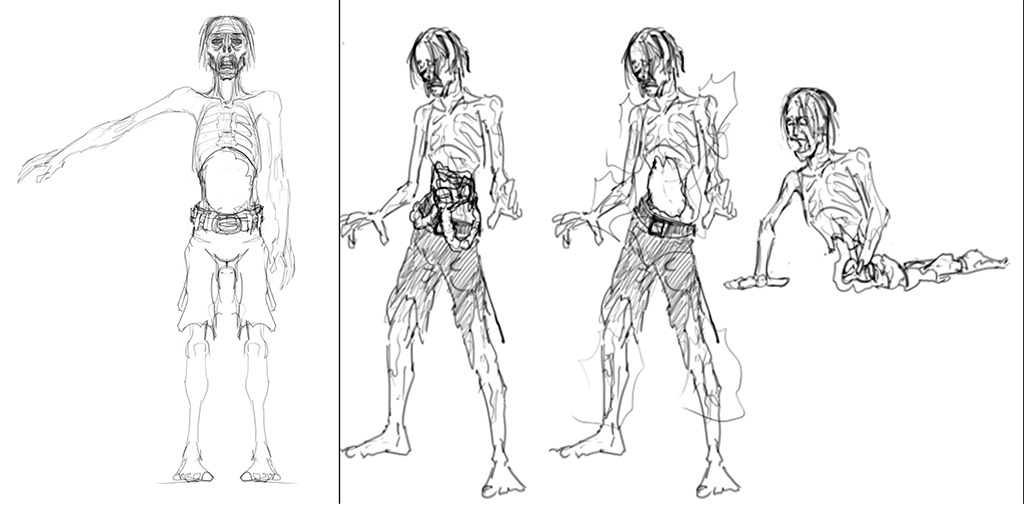
Anyway, here’s the obligatory comparison between concept and final:
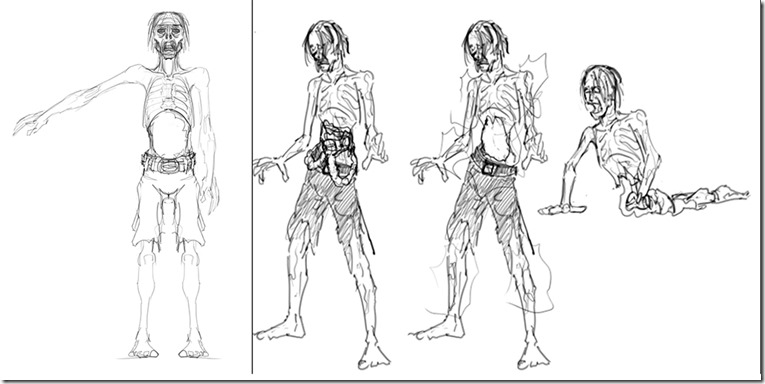
A lot of difference… Our artist uses the concepts mostly to “feel” the character, not as much as a plan…
Catch you on a future update!
Well, it’s been almost one month without updates… Reason for that is simply we didn’t have time for any real development on Grey… All of us have full-time jobs, and all of us had a really heavy month, work-wise…
Work has not stopped completely on the game, we simply don’t have anything interesting to say on the subject…
Rincewind finished the new model for “Grey”, but we can’t show it in the game yet because while updating the resource library of the SurgePlayer I found a bug that I want to address before moving onwards… I could do a manual replacement, but that defeats the idea of spending on having a full, complete editor… specially if I have it my way and we end up releasing it in the future; I don’t want to release something that has bugs…
Anyway, I found that the way the bone/skeleton system works in my engine is terrible for resource updates.
Currently, there’s no “strong” relation between the skeleton, the poses and the mesh itself… This means that theoretically, you could use use any pose on any skeleton, and on any mesh… I say theoretically, because if you use a skeleton that wasn’t intended for a specific mesh, it will just break down all the transforms (you can do it, but you need something called a retargeting, which in fact actually builds a new skeleton/poses). There’s all sorts of dependencies between these elements (mesh/skeleton/pose), but the engine didn’t acknowledged them in practice, which meant that when you update one, you expose yourself to a whole world of problems if you don’t update the others properly… And that was what was happening…
Old Grey model had 49 bones, the new one has 47… and just this small difference would cause the whole system to crash…
I tried building some workarounds, notifying the pose that the skeleton has changed, but that just caused a huge cascade of events (another inefficiency: all poses/keyframes store a pointer to the parent skeleton… and I have thousands of frames per skeleton!), and it really was just a patch…
So I decided to bite the bullet and rebuild the whole bone system from scratch, making the ties between the elements stronger and less error prone (and I’m taking the opportunity to make them faster to load and more memory efficient)…
This means that I currently have a full offline engine (can’t even compile for now), will have to do a tremendous amount of work to support the old resource loaders Reality 2.0 and upgrade Reality 3.0 to 3.1 (besides keeping the compatibility with the old assets: doing an automatic conversion tool would just be sloppy and probably harder than just fix the issue)…
So, I don’t expect I’ll be able to get this up and running in the next couple of weeks… work is kind of insane at the moment, finishing a lot of projects and revving up to start new ones, besides an impending move to a new office… But we’ll all do our best… except for the bugs (this one was kind of unexpected, but most bugs are) and the UI system (which I had some great ideas for, due to the current project I’m working on for DayJob), most technology should be ready to go and I’ll be ready to work on game logic…
Yeah, yeah, famous last words…