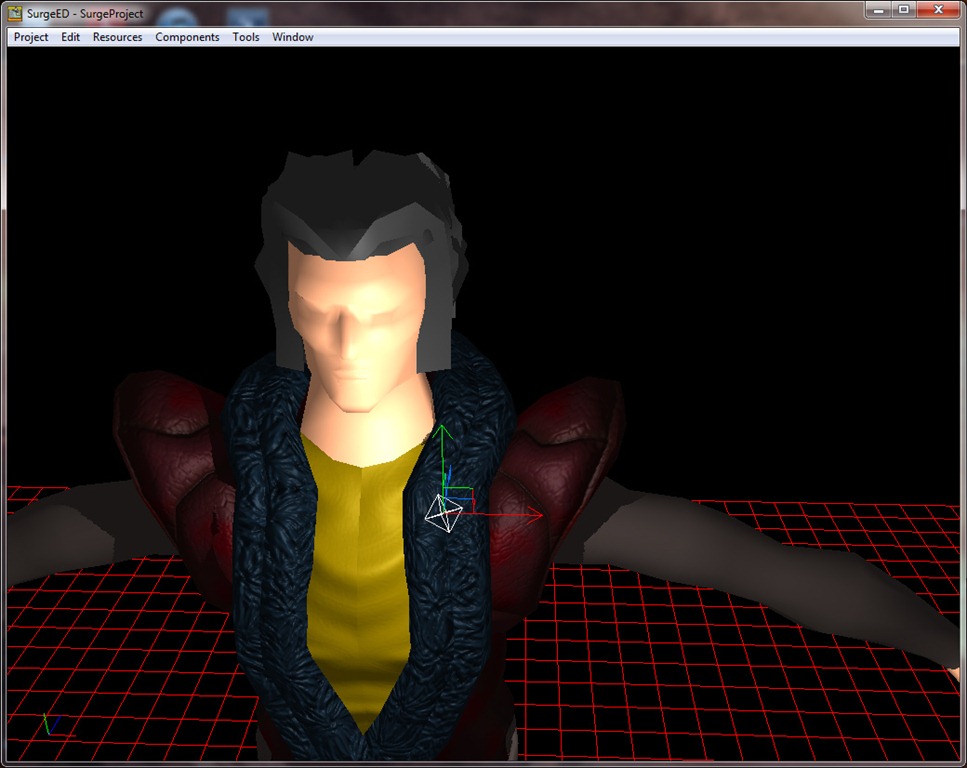
Practically finished the technological aspects of the RPG system, with the addition of channeled and area-of-effect (AOE) abilities.
Had to change some of the RPG flow because of the periodic effects.
The problem was that it caused some erratic behaviors; considering that we had an “heartbeat” in the system, ticking every 2 seconds. So, every periodic effect (like resource regeneration, healing or damage effect, etc) would trigger every 2 seconds. So, let’s imagine our enemy has a buff that restores some health every 2 seconds, and we are casting a channeled spell that does some damage also every 2 seconds, for 6 seconds:
| Time (seconds) |
Effect |
Note |
| 0 |
HB |
|
| 2 |
HB |
We start casting the channeled spell |
| 4 |
HBD |
|
| 6 |
HBD |
|
| 8 |
HBD |
Casting finishes |
| 10 |
HB |
|
| 12 |
HB |
|
where ‘H’ is the heartbeat, ‘B’ is the buff and ‘D’ is the damage. This seems alright (besides the fact that the smallest granularity of a periodic effect is 2 seconds).
Continue reading →
Took me longer than I expected, but it also has more functionalities available… I give you:
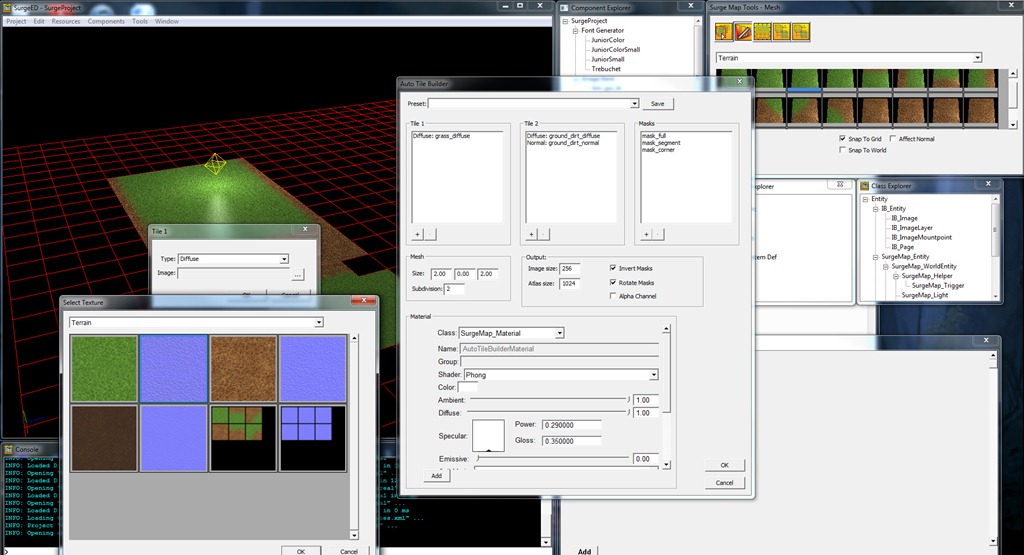
The AUTOTILE BUILDER:
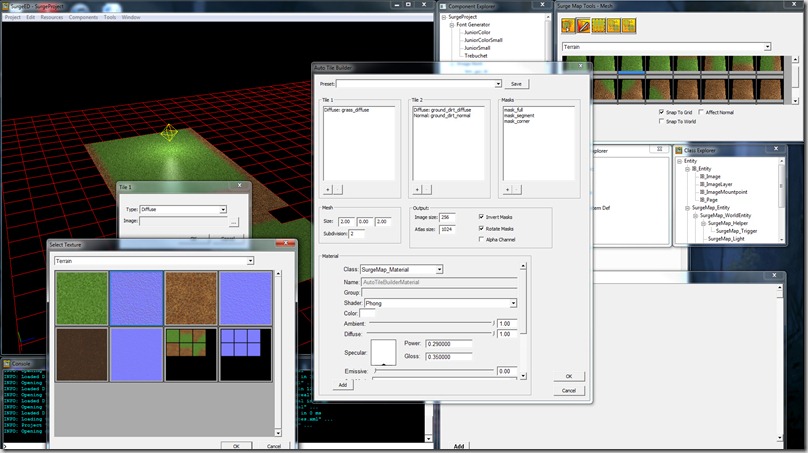
This does what I described in the last post: creates transition tiles between two types of “terrain”, depending on a mask. It also allows for the user to specify a template material that is used to setup all the material colors of the generated tiles (from shaders to custom properties).
Continue reading →
A bit late, this post, but work and personal things have been hectic lately…
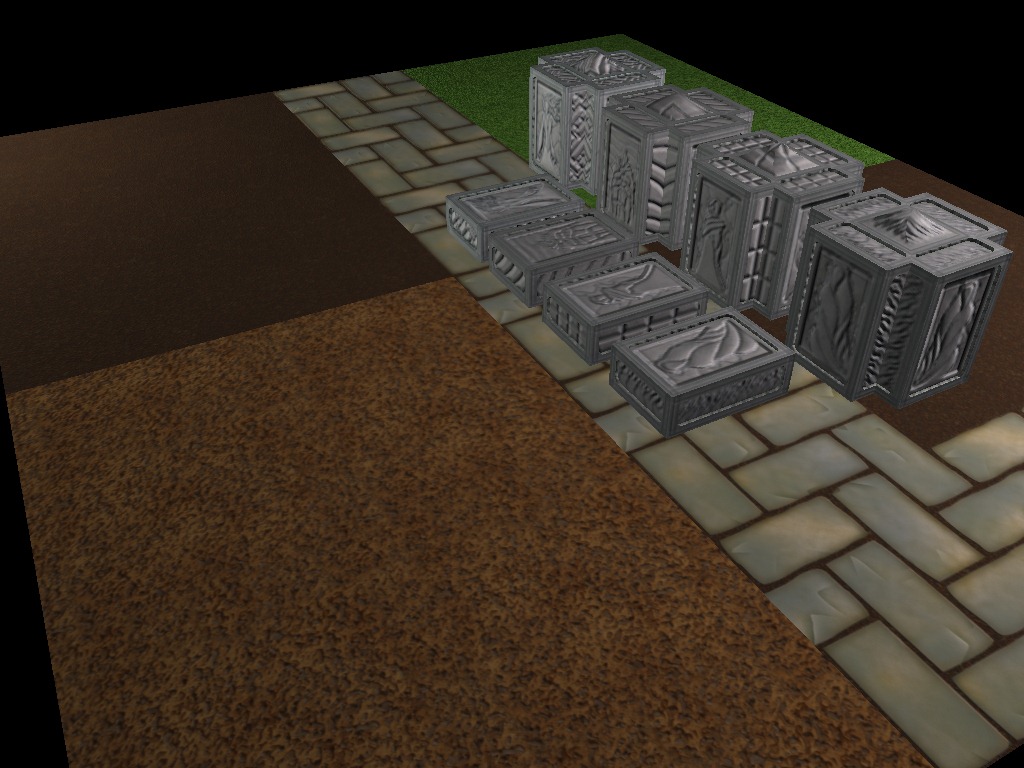
Anyway, Rincewind has been working on some content for the Calabeth graveyard in the game:
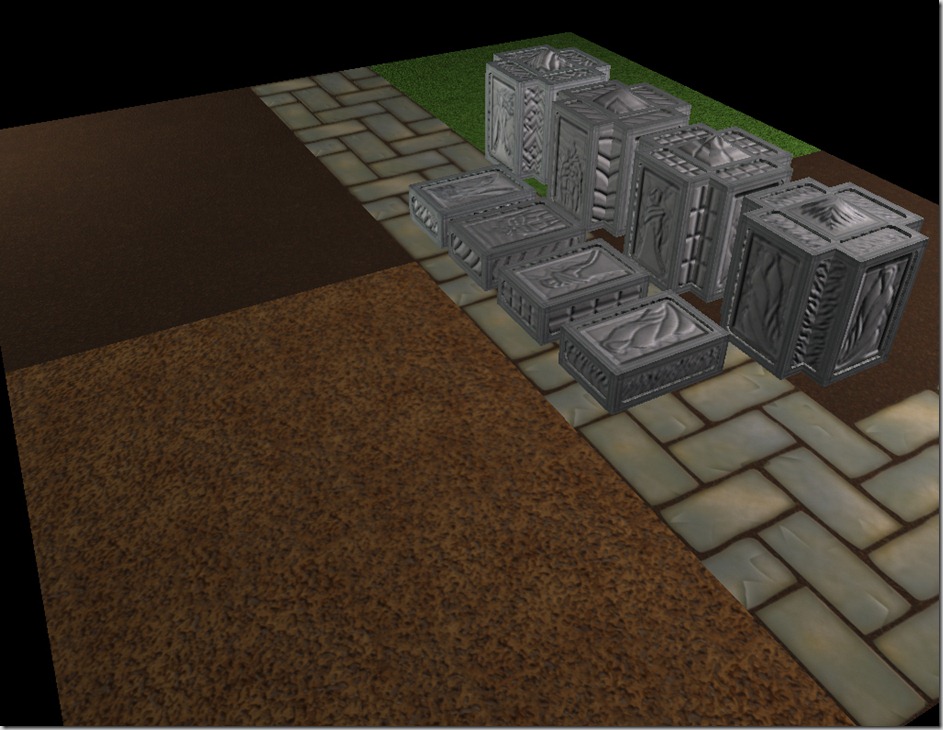
You can see some ground tiles and some tombs/mausoleums.
Continue reading →
Work continued on the RPG system this weekend, mostly the technological components.
By “technological components” I mean the code that actually drives the spells and abilities system (including cooldowns, cast times, life-shaping, etc).
This was quite a complicated system to build, because it is all written in Lua (which makes some stuff easier, but debugging is not as good as the usual Visual Studio work I do). The other reason why it was so complicated is that I had to defined a series of rules and the sequencing of events.
For example, let’s imagine a character shoots a fireball at another character. When the fireball is travelling, the caster characters gets buffed with additional spellpower; should that affect the travelling fireball? And let’s imagine that we decide that the fireball doesn’t get the buff if it is already on-route, what if the target gets a kind of mana shield (a shield that trades mana for damage absorption), should that affect the fireball that’s already flying towards him?
Then we have realtime events (things that happen every frame, like cooldowns ticking down, fireball travelling and hitting the target, etc), and turn-based events (things that happen every X time, like health and resource regeneration)…
And to add some final complexity, we also need to decouple the visual aspect of the game (selecting units, travel times for spells, etc) from the internal workings of the RPG system (so that I can have the RPGTester application running simulations to identify some balancing issues).
So, I had to formalize the sequence of events in the game:
Continue reading →
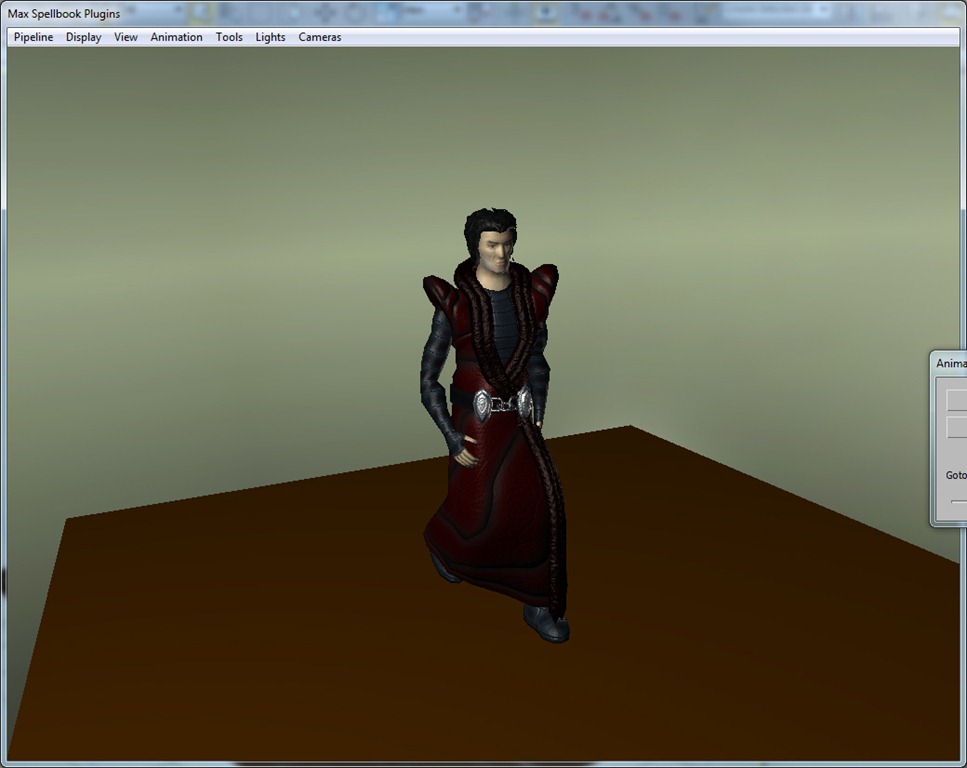
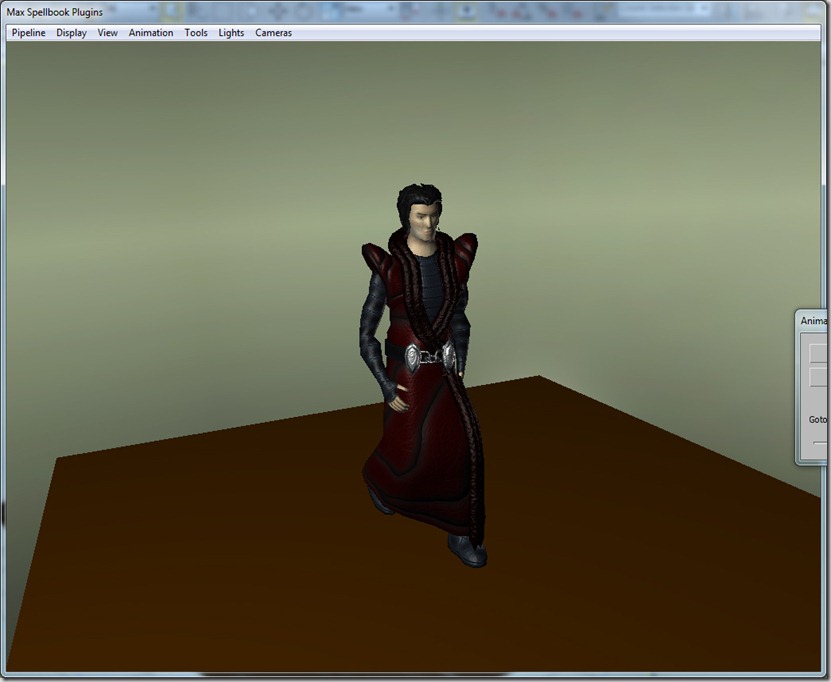
…of which unfortunately I couldn’t make a video of… For some reason, my FRAPS stopped working on my modeler plugins, so the videos for these will have to wait until we can add the character to the actual game (which will only happen when I finish the mechanical aspects of the RPG system and we have some background art to put in place in a test scene).
Anyway, here’s some screenshots of poses:
Continue reading →
This weekend I’ve worked more on the RPG system of Grey.
The health and resource system I managed to complete last week.
In my RPG system, you can think of “resource” as fuel for abilities. Mages have “mana” as a resource, life-shapers “resolve”, warriors have “bravado”, and so forth.
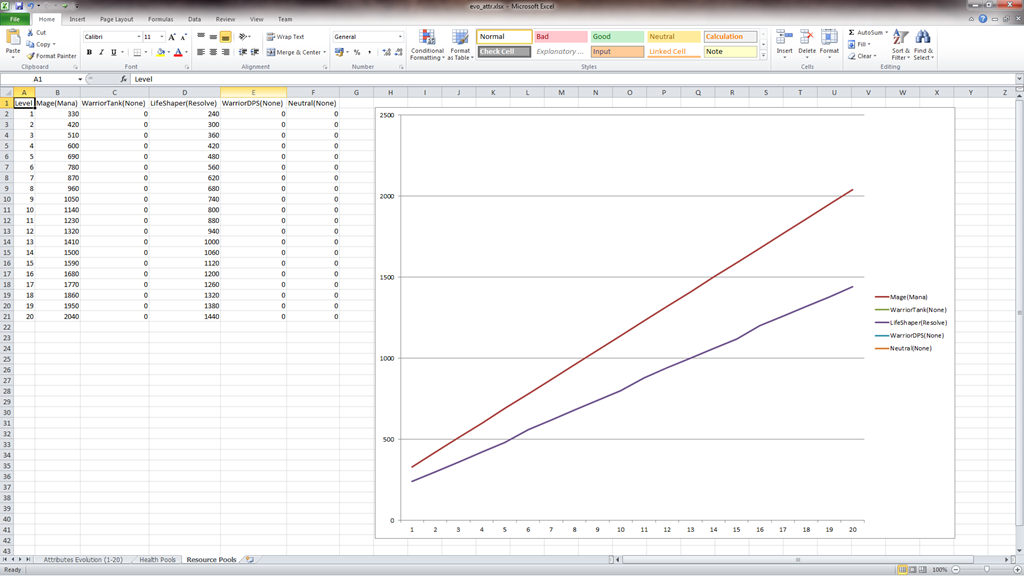
Currently, I’ve only worked on the mana and resolve equations:
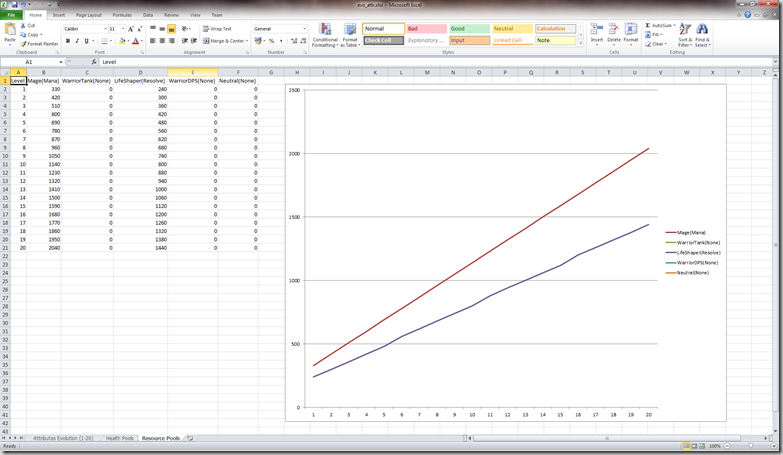
Continue reading →
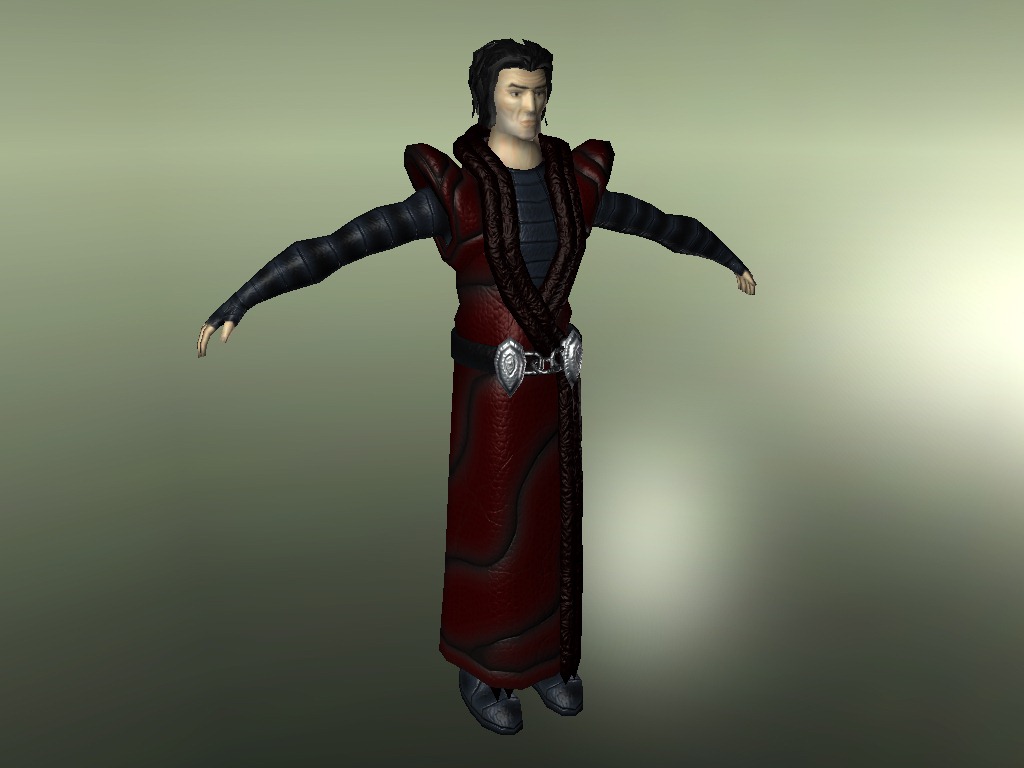
Rincewind wasn’t kidding when he told me he was rusty in 3d modeling, etc… But, after a long time, he managed to finish the texturing of the main character of Grey:
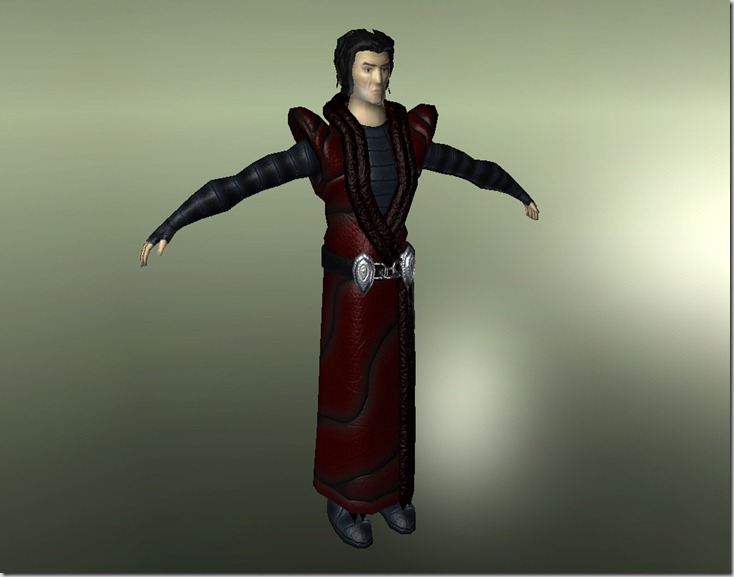
Continue reading →
Spent most of the weekend working on the RPG system of “Grey”.
The mechanics of “Grey” require a stable (C)RPG foundation, with all the usual systems, like primary attributes, derived attributes, talent trees, equipment and buffs/debuffs, and building that is a challenge.
Of course, I could have used one of the dozens of open/free RPG systems available and adjusted them for my own needs, but to be honest, this seems like something fun and making “Grey” is supposed to be fun, so that’s the route we’ve chosen to take, although it is a challenging one.
We’re aware that balancing a RPG is no small feat, and we decided to tackle that issue from the beginning, creating tools that will allow us to do so.
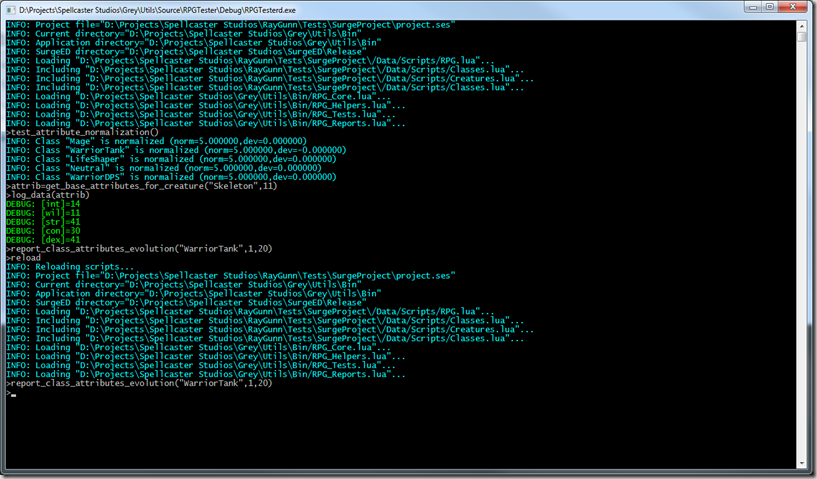
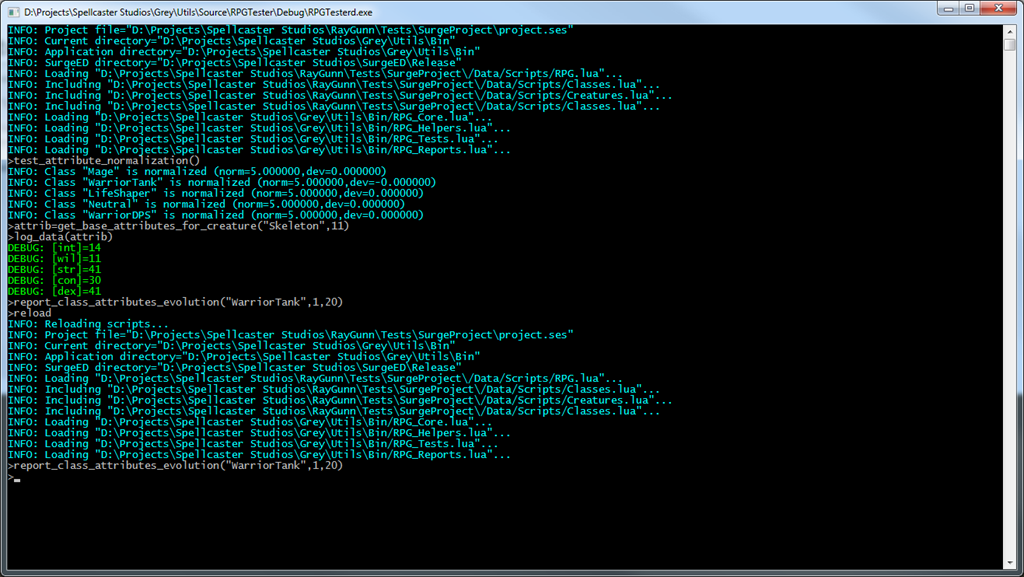
This is RPGTester, the application we’ve made to use as a sandbox for RPG-system related tests. It’s just a console window that incorporates a full Lua parser (since the RPG logic is all built using Lua scripting), that uses the game files themselves as a basis for testing and reporting. It even allows me to rebuild the data files that build the creatures and classes built from the database with just one command.
So, I have creature definitions (for example “Skeleton”). This “Skeleton” has a class associated with it (in this case, “WarriorDPS”, which means that it is a melee offensive character). This class will be used for at least two things: to select the AI to use on this character and (more important for our current discussion) to choose how the basic attributes of the character evolve with its level.
There are currently 5 basic attributes on “Grey”:
- Constitution (CON): This describes how built the entity is, and affects directly the health pool size.
- Strength (STR): This describes how strong the entity is, and affect how much damage the entity deals in melee combat, and how much damage he can absorb in melee defense.
- Dexterity (DEX): This describes how agile the entity is. It affects how good the entity is at dodging physical attacks, and how precise he is with ranged physical weapons. It also affects how fast the entity moves and how fast his action resource fills up
- Intellect (INT): This describes how smart the entity is, and affects how large the mana pool size is. It also generally affects the power of any spells cast.
- Willpower (WIL): This describes how powerful is the will of the entity. This mainly affects regeneration rates (for health, mana and others), the power of the some spells and more importantly the life-shaping component of the game
These will probably change over time, as we test out the game and tune the mechanics, but this will serve as a basic guideline for now.
Now these will evolve over time, and I had to find a formula for this. I decided on a linear equation, since I want these attributes to scale smoothly over time, since they serve as a basis for most of the others (like critical strike chance, etc).
To account for the different class/roles, I had to add some weighting that’s stored with the class. The reason for this is that it doesn’t make much sense to have a “Life Shaper” character having as much CON as a Warrior. This will make entities like healers to be squishy, while warriors will be very hard to kill but don’t deal that much damage.
I had also to guarantee that the classes were normalized. That means that for a specific level, characters of a specific class don’t have more attributes than characters from another class. To guarantee that, I created a test on RPGTester that checks for the normalization (in the screenshot above you can see a “test_attribute_normalization()” call being made to test it.
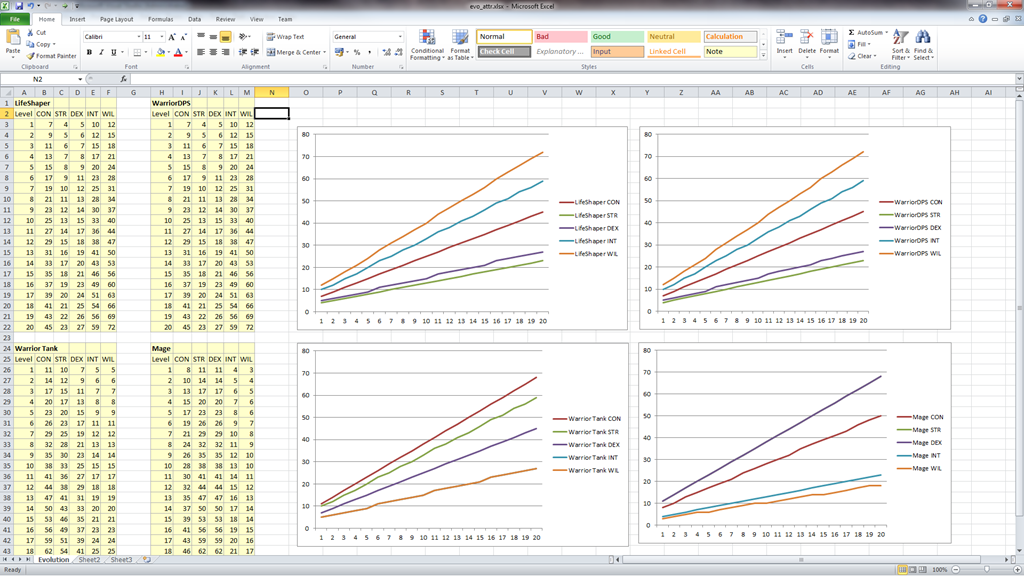
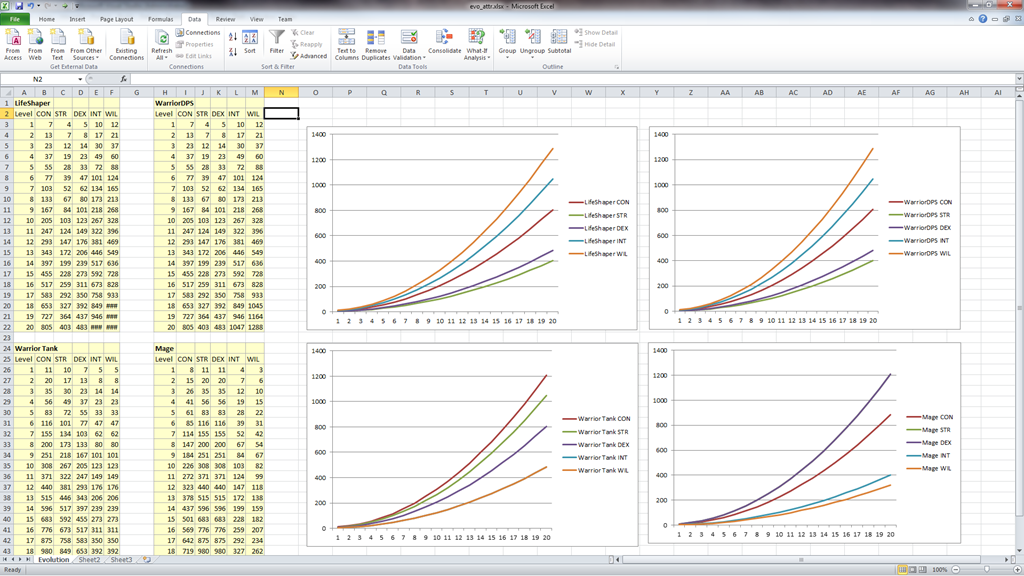
After that, I had to test the values of the attributes themselves, to see if they were being prioritized right depending on role. For that, I created a report (which is just a tab-separated value table) that lists the values of the attributes over the levels. Then I imported that data onto Microsoft Excel and plotted graphs that allowed me to look at the data:
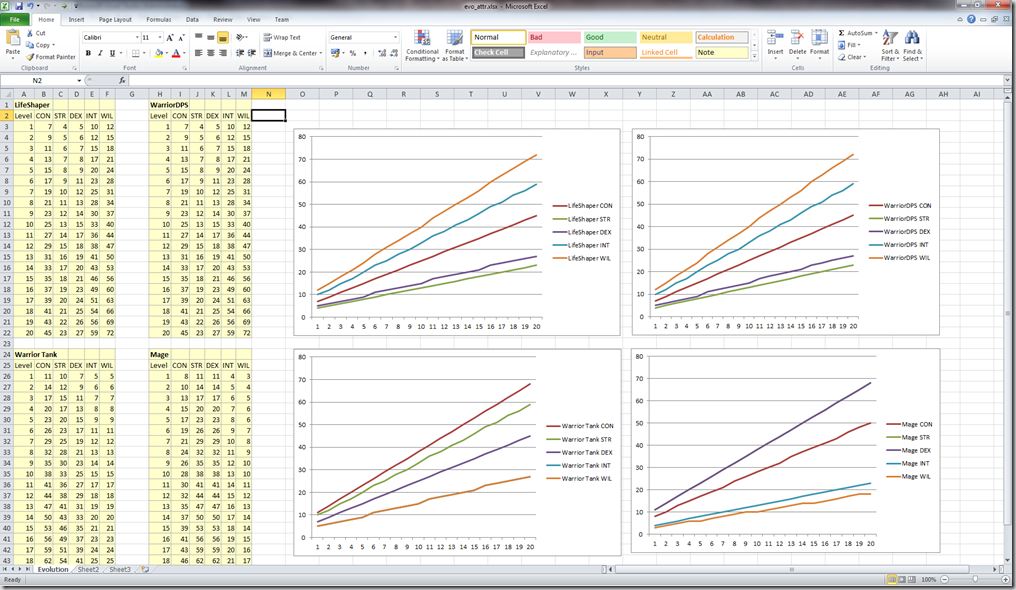
In this case, 4 reports leads to 4 graphs, and you can see that for example Life Shapers will have more willpower, while mages have more intellect; and both of them have less constitution than warriors.
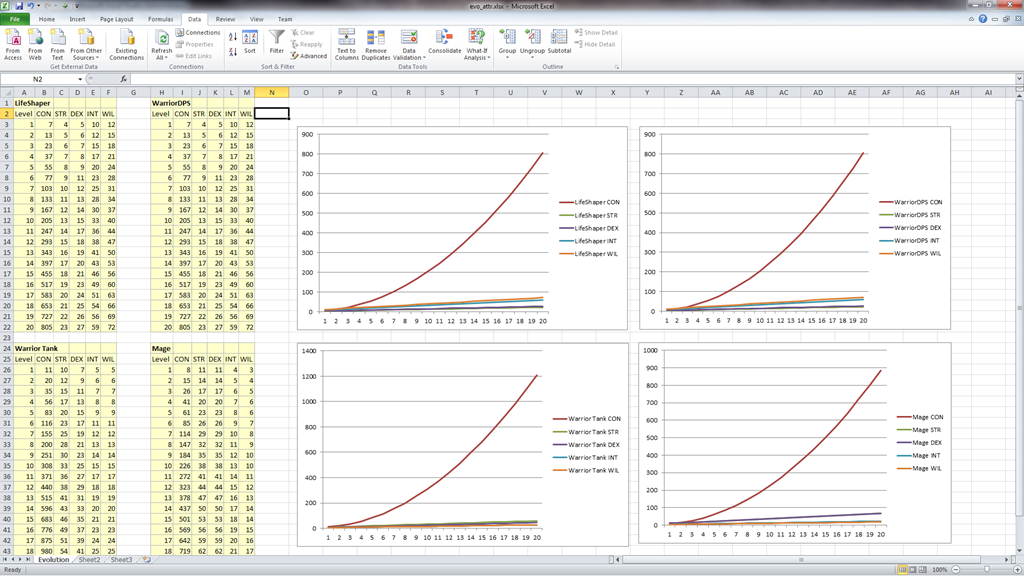
Since Excel has a sweet dynamic dynamic link system, so every time I want to see the impact of changing the computations of the the attributes, I just need to run the report tool and press a button in Excel to see the graphs changing. For example, in the next screenshot, I just changed the calculation of CON to be with the square of the level (kind of explodes, I know):
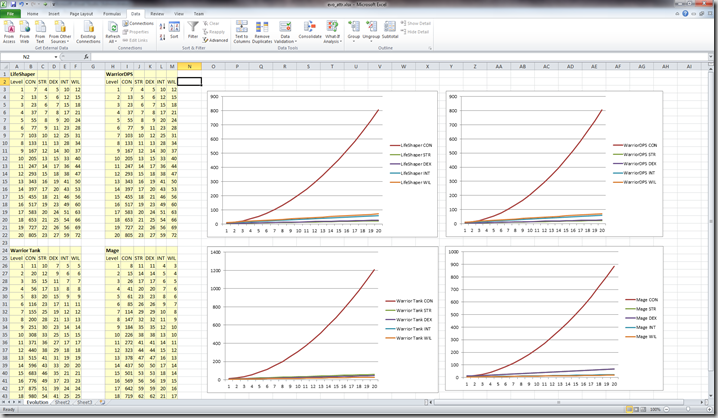
And because I can’t resist playing around, going with squared on everything:
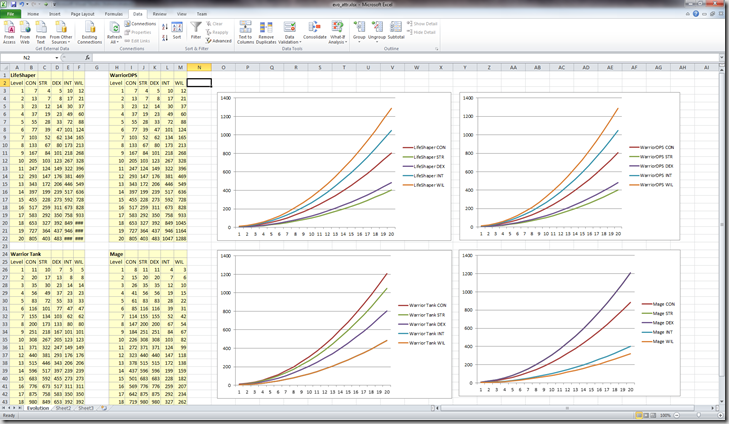
I’ve only listed 20 levels, but episode 1 won’t even probably have that (we’re aiming for 10 levels, at this moment).
On top of this class-based evolution, each character itself can have modifiers for the attributes, so we don’t have to make a new class for a specific creature that should have more health or spell power.
Next step on the RPG system will be to add the health pool calculations and displaying that in-game; should take me the next couple of days, since we’re all so excited with the development of the RPG system… It gives us the feeling we’re actually working on the game, instead of the technology, which is great for motivation (and the lack of motivation is the number one enemy of any group of people trying to develop a game in their free time)!
Work has kind of slowed to a crawl lately, since our real jobs are stressful of late, and after a day of complicated programming work, my night-time coding really takes a hit.
Still, I managed to make some progress with the GUI elements of the game.
The way I’m developing the game is to use my bad programming art and stuff I have lying around in my hard drive from previous projects to drive it forward… This way I don’t have to wait for Rincewind, and I get to experiment with the Lua scripts and see any pitfalls we have to be careful with.
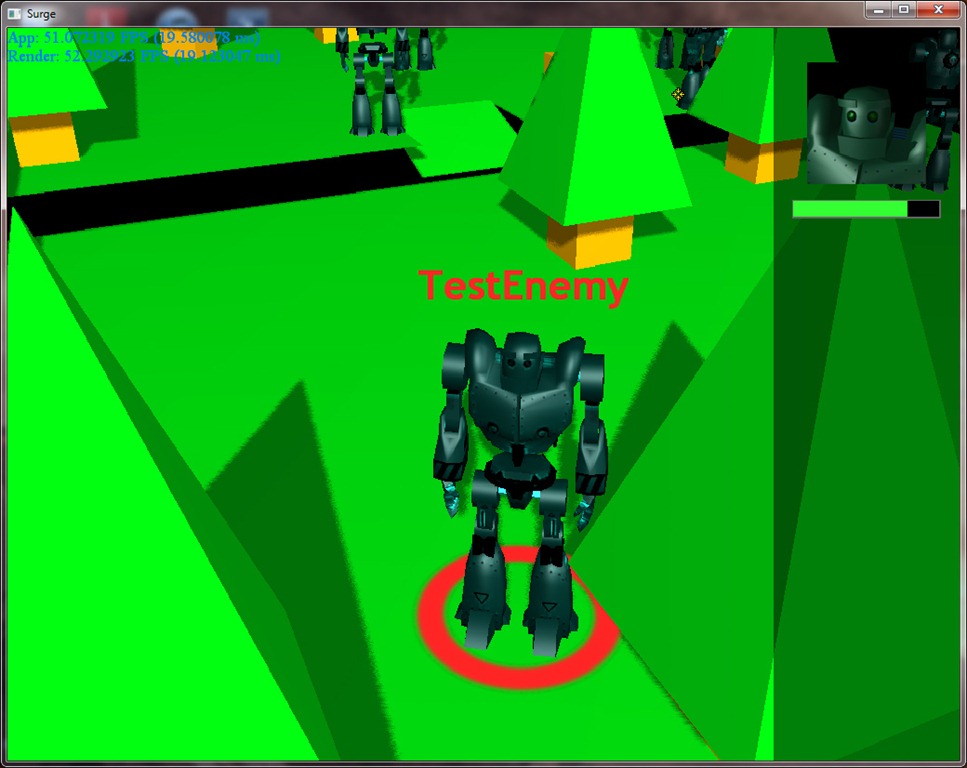
Currently, I’m working on getting the player to select an unit (a friendly one) and command it to move to a specific place in the game scene, using path-finding. At the moment, the player can select any creature in the game world and see its portrait and health:
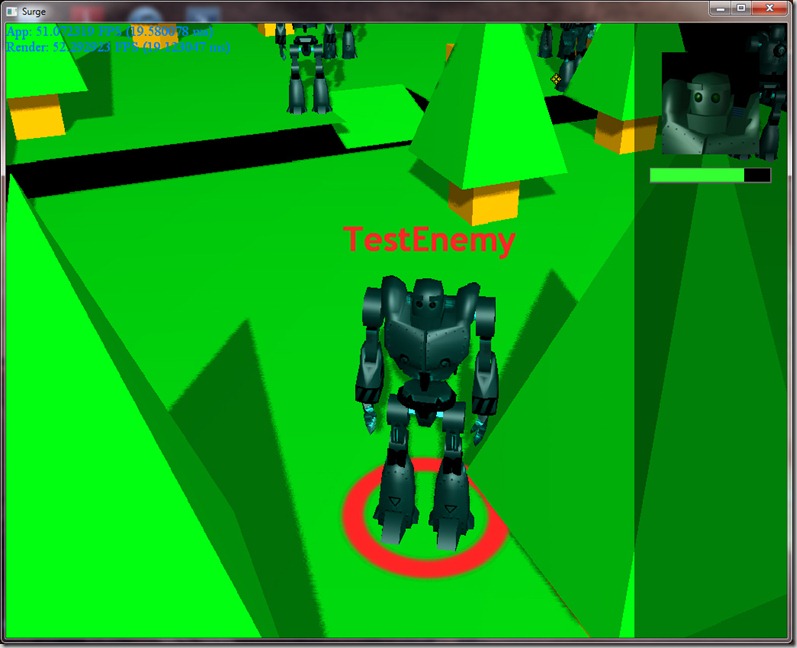
This of course is not using any final art, just beautiful programmer art!
On SurgeEd, I just built an image bank with a mouse cursor and a “selection circle” (that thing on the character’s feet). I also created another image bank with the portraits of the two creatures available in this experimental framework (the dark and the red robot). Then I added on the game database (a simple MySQL database) the fields for the portrait image name and ran my data file application (all without leaving the editor).
The data file application grabs tables from a database and converts it to a Lua file with the definitions, so I can use it in scripting. An example of one entry would be:
Classes["TestEnemy"]= {
   base_faction="Neutral",
   editor_category="Test",
   lua_id="TestEnemy",
   portrait="massive_dark",
   template_name="DarkMassive",
   type="Human"
};
I can then use this freely in my scripts.
In this case, every time the player clicks on the screen, a function that I registered is called by the event, I do some raycasting (to find out what has the player clicked on), if it is a character, I update the GUI on the right side of the screen (the health bar and the portrait, accessing the Classes table I automatically generated from the database), and I add two new 3d objects: the text on top of the character (simple billboarded text, although I have a lot of control over the way it is displayed, like color, facing, size, distance scaling, etc) and the selection circle on the bottom (a 3d sprite).
This is all done through scripting, and the code for this doesn’t take more than 20 lines or so, which is pretty economic…
And since I use LuaJIT to run the scripts, it’s very fast (the slow part is the raycasting, which is done in pure C++).
Now, I’m working on finding out where the player clicks the selected unit to go (right-click on the environment)… Already have a rudimentary system working, but it was a challenge getting to work, because it was hard finding a way to transfer array/list data from C++ to Lua without making it overly complicated from an usage standpoint…
In the meantime, Rincewind is still working on the main character’s model, but he won’t let me show it yet (which might be a good idea, since he’s missing the top half of his head while he does the hair)… I’m very happy with the results of the normal mapping on the face, specially considering all the problems we had on the weekend with it…
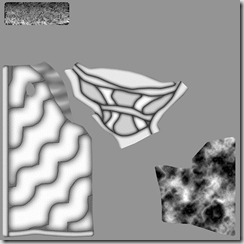
On “Grey”, we want to use normal maps to add some detail to the basic geometry of the models; this is pretty common in modern games.
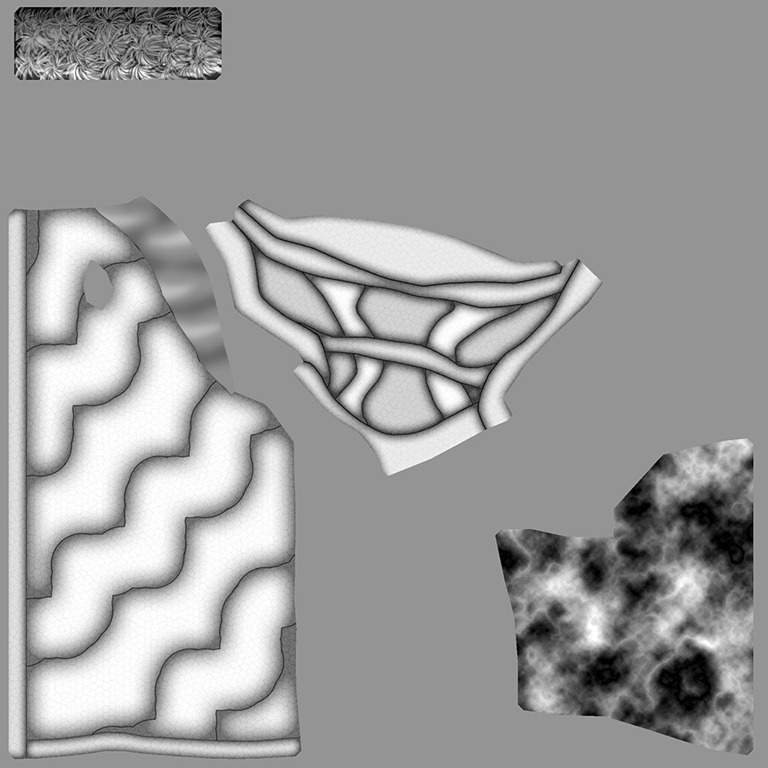
The way we do it at the moment is to create a texture that describes the bumps in the surface (white is for “high”, black is for “low”):
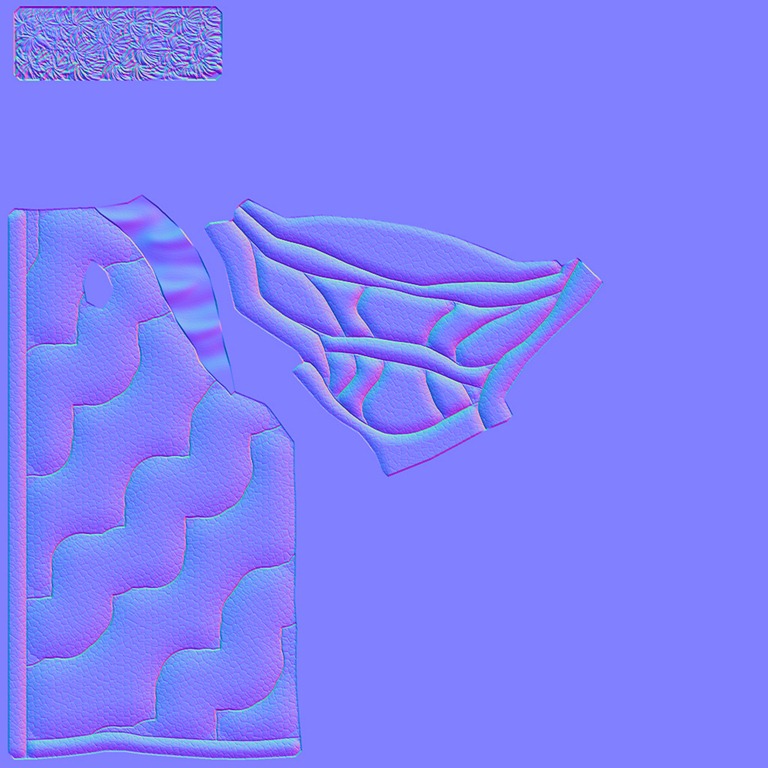
Then we process this with a tool by NVidia that converts this to “tangent-space normal maps” , which is fancy name to describe the distortions to the surface (from a lighting standpoint):
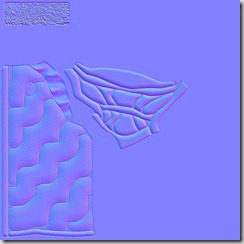
This image indicates a the distortion to apply to the normal of the surface (the normal can be thought as the way a surface is pointing). The base color you see (most of that texture) is the “neutral” color, which means no distortion… the more you deviate from that cover, the more distorted the normal will be and that allows us to simulate small surface details.
All this is done through some magic math that transforms the light properties into a local space called “tangent space”, that is calculated at each vertex of the model. You can read more about this at Wikipedia, for example.
Anyway, this is all fine and dandy, but we’ve run into some problems with it:
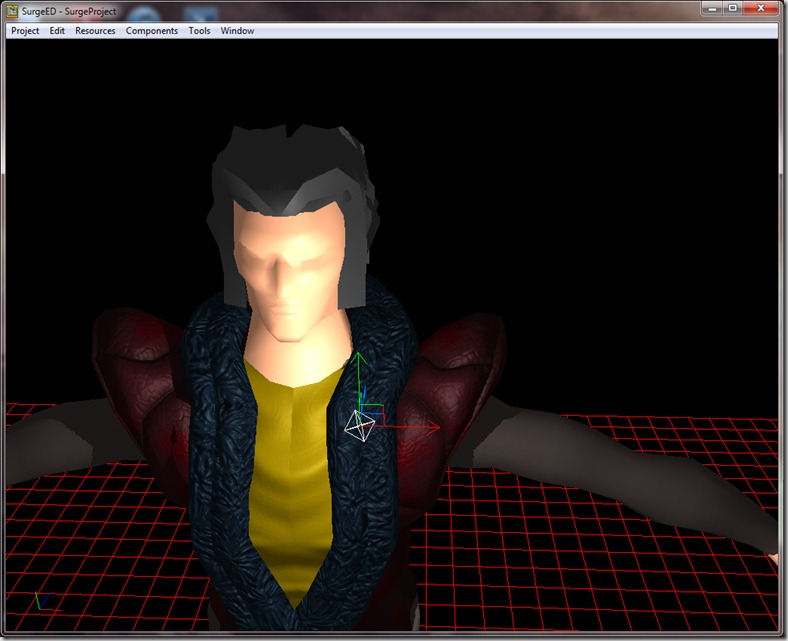
You can see the big seam along the middle of his shirt? That’s because we use “mirroring” on the texture coordinates (which is a mapping between the real world coordinates and the 2d image that we use to color the model). The mirroring allows us to use half the texture space than normal (we only store half of the model, the rest is “mirrored”), but it introduces this problem, because the tangent space mapping is no longer continuous (it goes one way, and instantly changes direction to the inverse one, simply put), and this shows in the illumination of the model…
This problem is very common, even in high-end engines, because it has to do with the mathematical model of normal mapping itself, and while it is easy to disguise it in static models, animated models usually show this problem at some point in the geometry.
There are ways to minimize this, by tweaking the texture coordinates, or doing some magic voodoo on the normal map texture, or any number of tricks, but we’re trying to figure out a way to minimize the time we spend on each model, since we’re a small team and time is our most precious commodity!
We’ve spent some hours in the weekend wrestling with this problem, trying to figure out why the problem occurred (from a mathematics point of view) and what we could do to minimize it, but we haven’t found a single solution to this issue that might actually solve it without increasing our workload; the best we’ve come up so far is to avoid using mirroring and just stretch the texture (which would allow us to add some more surface details, different on both sides of the shirt and robe).
We’ll keep on working on this, since it’s very important in this early stage to get a functional pipeline, even if it means delaying the initial models a bit…